
For eBay sellers who also want Depop coverage, SpareDollar is the strongest pick: it turns a single photo into a channel-adjusted, AI-drafted listing across both marketplaces, and nothing goes live until you say so.
- AI photo-to-listing workflow generates titles, descriptions, and price suggestions from your product photos, then waits for your approval before publishing anywhere.
- Inventory sync with auto-delist on sale means selling one item on eBay instantly removes it from Depop, so double-selling becomes someone else’s problem.
- eBay-first item specifics are mapped automatically, with Depop’s categories and tags adjusted per channel.
- Free trial available. Official eBay integration included. Start at sparedollar.io.
Table of Contents
- Why SpareDollar works for Depop sellers who run eBay first
- What features actually matter in Depop listing software?
- How the SpareDollar workflow looks from day one
- Pricing and plan guidance for Depop sellers
- How to evaluate any Depop listing tool before you commit
- Key Takeaways
- The part most sellers skip (and regret later)
- SpareDollar’s free trial is where to start
- FAQ
Why SpareDollar works for Depop sellers who run eBay first
Most Depop listing tools are built for fashion resellers who live on Depop. SpareDollar is built for eBay sellers who want Depop as an additional channel without rebuilding their workflow from scratch. That distinction matters more than it sounds.
The core value is simple: list once on eBay, and SpareDollar adapts that listing for Depop’s categories and tags automatically. The AI drafts the title and description from your photos, adjusts the fields per channel, and queues everything for your review. You approve, then it posts. No auto-publish surprises.
Three strengths stand out for cross-listing sellers:
- AI listing generation from photos — computer vision reads your product image and produces a keyword-rich title, description, and price suggestion. AI generators can reduce batch listing from hours to minutes.
- Channel-adjusted item specifics — eBay requires structured item specifics; Depop rewards hashtags and aesthetic-aware descriptions. SpareDollar handles both without you rewriting anything.
- Server-side inventory sync — unlike browser extensions that depend on your local device, SaaS platforms process sync in the background, so auto-delist works even when your laptop is closed.
SpareDollar is available in the US and integrates with eBay, Depop, Poshmark, Mercari, and Shopify.
Pro Tip: If you’re listing fewer than 20 items a month and only selling on Depop, a lightweight browser extension may be enough. Once you’re cross-listing across eBay and Depop with 50+ active SKUs, a SaaS platform’s server-side sync and analytics pay for themselves fast. That’s the volume trigger worth watching.

What features actually matter in Depop listing software?
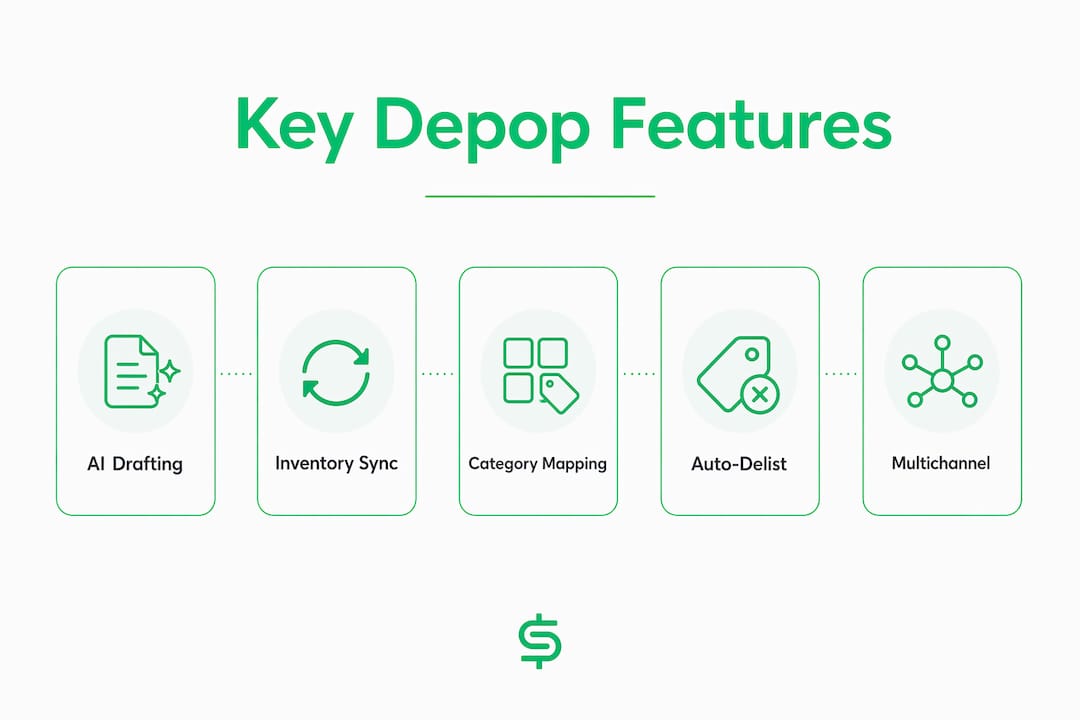
The best Depop listing software does more than generate a description. Here are the eight feature areas that determine whether a tool earns its keep or just adds a new tab to your browser.
- Depop channel mapping and tag generation. Depop’s algorithm weights the first few words of a title heaviest, so tools that front-load brand, item type, and key attributes improve search visibility. Hashtag generation tuned to platform trends matters too — most tools generate five targeted hashtags aligned with buyer aesthetics, which matches typical buyer search behaviors.
- AI title and description generation from photos. Computer vision reads condition, brand labels, and item type from images and produces a draft. Verify accuracy on at least 10 representative items before trusting it at scale.
- Inventory sync and double-sell protection. Centralized server-side sync auto-delists sold items across all connected channels, even offline. This is non-optional for multi-marketplace sellers.
- Bulk listing and barcode scanning. Barcode scanning speeds up catalog entry for new-with-tags items; bulk actions let you update prices or descriptions across dozens of listings at once.
- Per-channel pricing and item specifics. eBay and Depop have different buyer expectations and fee structures. The tool should let you set different prices per channel without duplicating work.
- Analytics and delist-on-sale behavior. Sales reporting, profit tracking, and confirmation that sold items are removed promptly from all channels.
- Mobile compatibility. Mobile-friendly workflows and support for JPEG, PNG, WebP, and MP4 matter because most Depop sellers photograph and list on the go.
- Security and data privacy. Your inventory data, pricing strategy, and sales history are sensitive. Confirm the vendor uses encrypted connections and has a clear data-handling policy.
| Feature | Seller impact | What to test during trial |
|---|---|---|
| AI title generation | Faster listing, better search visibility | Check first 5 words for brand + item type accuracy |
| Hashtag/tag generation | Depop discoverability | Verify tags match current aesthetics, not generic terms |
| Inventory sync | Prevents double-selling | Simulate a sale; confirm delist fires on all channels |
| Barcode scanning | Speeds catalog entry | Scan 10 items; check category auto-fill accuracy |
| Per-channel pricing | Margin control per marketplace | Set different prices on eBay vs. Depop; confirm they publish correctly |
| Mobile support | List anywhere | Complete a full listing from a phone, including photo upload |
| Analytics | Profit visibility | Check that sold items show correct fees and net margin |
How the SpareDollar workflow looks from day one
The core flow is: photo → AI draft → seller review → channel-adjusted publish. Setup typically completes in a few hours to a couple of days, depending on inventory size.
- Connect your eBay account first. SpareDollar’s eBay integration is the primary anchor. OAuth connection takes a few minutes.
- Import existing inventory or scan barcodes. Free imports pull in your current eBay, Poshmark, Depop, Mercari, or Shopify listings. New items can be entered via barcode scan.
- Upload product photos. Drag in your images. The AI reads condition, brand, and item type from the photo.
- Review the AI draft. Titles, descriptions, hashtags, and price suggestions appear for your approval. Adjust anything before it moves forward. AI price suggestions use category, brand, and condition data — treat them as starting points, not final answers.
- Select channels and adjust per-channel settings. Choose eBay, Depop, or both. Set channel-specific prices if needed.
- Post or queue. Nothing publishes without your confirmation. Queue listings for a scheduled time or post immediately.
- Auto-delist on sale fires automatically. When an item sells on either channel, SpareDollar removes it from the other. Confirm this behavior during your trial before going live with your full catalog.
Pro Tip: In your first 24–48 hours, run a batch of 5–10 test listings before touching your live inventory. Check that Depop tags look right, shipping presets pulled through correctly, and the delist-on-sale simulation actually fires. Catching a misconfigured preset on a test listing beats discovering it after a double-sale.
Pricing and plan guidance for Depop sellers
SpareDollar uses tiered monthly subscriptions based on new listing volume, with optional one-time listing packs for sellers who need extra capacity without upgrading their plan permanently. A free trial is available, which is the right place to start.
Practical guidance by seller type:
- Part-time resellers (under 50 new listings/month): Start with the free trial, then choose the entry-level tier. One-time listing packs let you handle seasonal spikes without paying for a higher plan year-round.
- Small shops (50–200 new listings/month): A mid-tier monthly subscription covers the volume and gives you access to bulk actions and analytics. The per-listing cost drops meaningfully at this scale.
- High-volume listers (200+ new listings/month): Monthly subscription tiers at the higher end make more sense than listing packs. The full feature set — barcode scanning, bulk edits, profit analytics — pays off fastest here.
During the free trial, focus on three ROI signals: time saved per listing compared to your current method, accuracy of AI categorizations on your specific inventory type, and whether inventory sync fires reliably. If the AI misreads your item types consistently, that’s a signal to test a different photo setup, not necessarily to abandon the tool.
Listing packs change the cost-per-listing math for irregular sellers. If you list 300 items in Q4 and almost nothing in Q1, a pack may cost less than three months of a higher-tier subscription. Run the numbers against your actual listing calendar before committing.
How to evaluate any Depop listing tool before you commit
The right tool is the one that passes your trial, not the one with the best feature list on a marketing page. Here’s the checklist.
- Test AI title accuracy on 10 representative items. Check that the first five words include brand and item type. One bad brand read changes price guidance and buyer expectations.
- Verify Depop tag generation. Confirm tags match current buyer search behavior, not generic placeholders. Most AI tools output five targeted hashtags, which is standard for Depop.
- Simulate a delist-on-sale event. Mark a test item as sold and confirm it disappears from all connected channels promptly. Ask the vendor for logs or a time-window guarantee.
- Check eBay item specifics import and export. Confirm structured fields (size, color, condition, brand) map correctly from eBay to Depop without manual re-entry.
- Complete a full listing from a mobile device. If the mobile flow breaks at photo upload or review, that’s a real operational problem for sellers who list on the go.
Red flags to walk away from:
- Auto-publish without seller approval at any step
- No inventory sync or delist-on-sale confirmation
- No official eBay API access (browser-scraping workarounds break without warning)
- Mobile experience that requires a desktop to complete a listing
- Customer support with no documented SLA or response window
Questions worth asking any vendor:
- What’s your API access model for eBay and Depop?
- How quickly does delist-on-sale propagate across all channels?
- Can I export my full inventory and listing history if I cancel?
- What’s your data encryption standard and privacy policy?
- How often do you push feature updates, and where’s the roadmap?
Key Takeaways
SpareDollar is the practical pick for eBay-first sellers who want Depop support: AI-assisted drafting, server-side inventory sync, and seller approval at every step before anything goes live.
| Point | Details |
|---|---|
| AI drafting saves time | Computer vision generates titles, descriptions, and price suggestions from photos, reducing batch listing from hours to minutes. |
| Seller approval is non-negotiable | No listing should auto-publish; always verify the tool requires your confirmation before any item goes live. |
| Test delist-on-sale first | Simulate a sale during your trial and confirm the item disappears from all channels before committing your full catalog. |
| SaaS beats extensions at scale | Server-side sync handles background processing and analytics without taxing your hardware or requiring your device to be online. |
| SpareDollar fits eBay-first sellers | It adapts eBay listings for Depop automatically, with free trial access and support for eBay, Depop, Poshmark, Mercari, and Shopify. |
The part most sellers skip (and regret later)
The conversation around AI listing tools tends to focus on speed, and speed is real. But the sellers who get burned aren’t the slow ones. They’re the ones who trusted the AI draft without checking it on their specific inventory type.
A tool trained on general fashion data may read a vintage band tee perfectly and completely misidentify a deadstock workwear jacket. That misread doesn’t just affect the title. It affects the price suggestion, the category, and the hashtags. One bad batch can mean underpriced items, wrong-category listings, and confused buyers leaving negative feedback.
The seller approval step isn’t a courtesy feature. It’s the actual safeguard. Any tool that makes it easy to skip review is optimizing for the wrong thing. SpareDollar’s approach of drafting first and publishing only after your sign-off is the right architecture for sellers who care about their reputation across channels.
Also: if your listing software can’t tell a Levi’s 501 from a Wrangler, maybe it needs glasses. (SpareDollar’s computer vision is working on it. The dad jokes, however, are fully operational.)
SpareDollar’s free trial is where to start
Skip the feature comparison spreadsheet. The fastest way to know if a tool fits your inventory is to run your actual items through it. SpareDollar’s free trial lets you do exactly that, with no commitment required before you’ve seen the AI draft your real listings.
Three things to test during the trial: AI photo accuracy on your specific item types, Depop tag and category mapping for your niche, and the delist-on-sale behavior when a test item sells. Those three tests will tell you more than any feature list.
SpareDollar supports eBay, Depop, and more from a single dashboard. The AI drafts, you approve, and inventory stays in sync across every channel automatically. Pricing tiers and listing packs are on the pricing page — and yes, there’s a free trial before you spend a dollar. (Spare one, even.)
FAQ
What is the best Depop listing software for eBay sellers?
SpareDollar is the strongest option for eBay-first sellers who also want Depop coverage. It generates AI-assisted listings from photos, adjusts fields per channel, and syncs inventory automatically to prevent double-selling.
Does SpareDollar support Depop-specific tags and categories?
Yes. SpareDollar adapts listings for Depop’s categories and tag structure separately from eBay’s item specifics, so you don’t have to rewrite listings manually for each platform.
How does auto-delist on sale work?
When an item sells on any connected channel, SpareDollar removes it from all other channels automatically. Test this during your free trial by simulating a sale before you go live with your full catalog.
Should I use a browser extension or a SaaS tool for Depop listing?
Browser extensions work for low-volume sellers who only need local automation. SaaS platforms like SpareDollar handle cross-marketplace sync server-side, which is more reliable at scale and keeps inventory updated even when your device is offline.
Can I import my existing Depop listings into SpareDollar?
Yes. SpareDollar offers free imports from eBay, Depop, Poshmark, Mercari, and Shopify, so you can migrate your existing catalog without re-entering listings manually.