
For most U.S. eBay sellers, SpareDollar is the strongest choice among eBay pricing tools because it combines per-channel pricing controls, AI-assisted price recommendations, inventory sync, and one-click cross-listing into a single workflow. You get the research foundation from eBay’s own Seller Hub and Product Research (which surfaces median sold prices and category trends), then layer SpareDollar’s automation on top to act on that data fast. This guide gives you the verdict, a feature checklist, a practical pricing workflow using Google Lens and LLMs, and a realistic cost breakdown.
Why SpareDollar stands out for U.S. eBay sellers:
- Per-channel pricing: Set a different price on eBay, Poshmark, Depop, and Mercari without touching each listing manually.
- AI price recommendations: The AI drafting engine suggests prices based on item specifics, not just gut feel.
- Inventory sync and auto-delist: When something sells on one channel, it disappears everywhere else. No more double-selling.
- Free import from eBay: Pull your existing listings in minutes, not hours.
Stat to know: eBay’s official guidance recommends using sold-item history and Seller Hub’s Product Research as the baseline for competitive pricing — the same data layer SpareDollar’s AI recommendations build on.
Table of Contents
- What do eBay pricing tools actually do?
- What features matter most in an eBay pricing tool?
- How do you choose the right tool for your workflow?
- Why SpareDollar is the recommended choice for U.S. eBay sellers
- How to combine eBay sold data, Google Lens, and LLMs into one pricing workflow
- What does pricing an eBay item actually cost you?
- Key Takeaways
- The case for keeping it simple (and a confession)
- SpareDollar turns one listing into revenue across every channel
- Useful sources
- FAQ
What do eBay pricing tools actually do?
Not all pricing tools are the same category of product. Sellers often conflate three distinct tool classes, and buying the wrong one wastes both money and time.
Research tools pull historical sold prices and market trends. eBay Seller Hub and Product Research are the official in-platform version: free, eBay-native, and good for spot-checking median sold prices before you list. Third-party tools like ZIK Analytics extend this with 7–30 day price history windows, sell-through rates, and sold counts across large product sets.
Repricers watch live listings and adjust your prices automatically, either by rule (“always $2 below the lowest competitor”) or by algorithm (AI-driven adjustments based on demand signals). Rule-based repricers are predictable and easy to audit. Algorithmic ones can react faster but need guardrails.
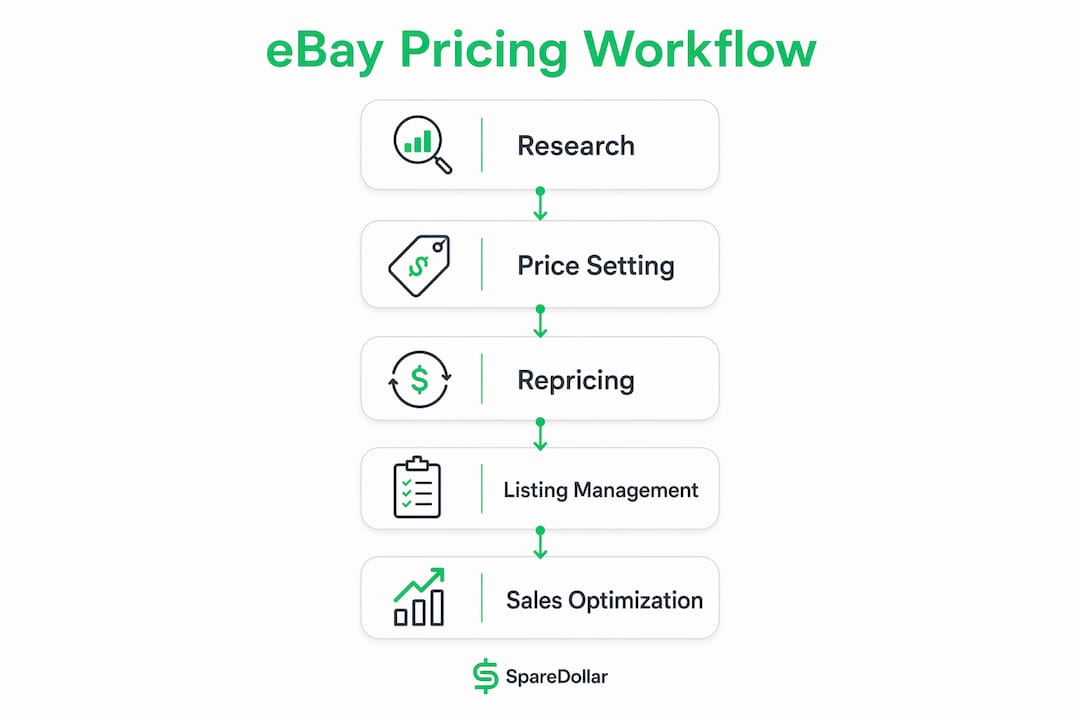
Listing managers handle bulk publishing, per-channel overrides, and cross-market distribution. This is where SpareDollar lives: you draft once, push to multiple marketplaces, and set a different price per channel without duplicating work.
In a typical seller tech stack, these three classes work in sequence. You research comps before sourcing, use a repricer post-listing to stay competitive, and rely on a listing manager to keep inventory consistent across channels. eBay’s bulk listing tools cover some of this natively for Pro sellers, but they stop short of cross-market publishing and per-channel pricing.
What features matter most in an eBay pricing tool?
The difference between a tool that protects your margin and one that quietly erodes it usually comes down to a handful of specific capabilities.
- Repricing approach (rule-based vs. AI): Rule-based is transparent and auditable. AI-driven is faster but requires min/max floors to prevent runaway price drops.
- Marketplace integrations: eBay-first tools handle item specifics correctly. Generic multi-channel tools often mangle category attributes.
- Per-channel pricing controls: Without these, you’re forced to price to the lowest common denominator across all channels.
- Inventory sync and auto-delist: A sold item that stays live on three other channels is a customer service disaster waiting to happen.
- Analytics and profit reporting: Net margin after fees matters more than gross revenue. Look for tools that subtract eBay final value fees from the reported profit.
- Repricing frequency: Some tools reprice hourly, some daily. For fast-moving categories (electronics, sneakers), frequency is a competitive edge.
- Min/max price protections: Non-negotiable. Without a floor, a repricing loop can price your $80 item at $4.
- Free trial or demo: Any vendor unwilling to let you test with real SKUs is hiding something.
Glimly makes a useful point here: per-variation pricing matters too. Each size or color in a multi-variation listing behaves like its own market. Tools that average across variations will systematically misprice your inventory.
| Feature | Entry-level | Advanced | Enterprise |
|---|---|---|---|
| Repricing logic | Manual rules only | Rule-based + basic AI | Full algorithmic + custom logic |
| Marketplace integrations | eBay only | eBay + 2–3 channels | 10+ channels with API access |
| Per-channel pricing | No | Yes | Yes + bulk overrides |
| Inventory sync | Basic (manual trigger) | Automated sync | Real-time sync + webhooks |
| Analytics | Listing-level only | Profit reporting with fee deduction | Full P&L + forecasting |
| Min/max protections | No | Yes | Yes + alert thresholds |
| Free trial | Rare | Common | Demo or pilot program |
How do you choose the right tool for your workflow?
Before you sign up for anything, run through this checklist on a vendor call or during a trial.
Questions to ask:
- Does the tool support per-channel pricing, or does one price push to all channels?
- How does repricing logic work, and can I see the rules it applied to a specific SKU?
- What happens to a listing on Channel B when the item sells on Channel A?
- How often does the repricer run, and is frequency capped by plan tier?
- Do you charge extra for API access, delist events, or additional SKUs?
- Can I import my existing eBay listings, and how long does it take?
- Who owns my listing data if I cancel?
Red flags to walk away from:
- No per-channel pricing controls
- Repricing rules you can’t inspect or override
- No free trial or demo period
- Inventory sync that requires manual triggering
- Fees that appear only after you’ve imported your catalog
Timeline to expect: Most sellers see quick wins within 30 days, mainly from catching underpriced items and eliminating double-sells. Full optimization, where repricing rules are tuned and cross-channel margin differences are dialed in, typically takes 2–3 months of monitoring and iteration.
For small-volume sellers (under 100 active listings), a flat monthly subscription with a generous listing cap is usually the right model. High-volume sellers should look hard at per-listing credit packs and whether the math holds at scale. A tool that costs $30/month but saves you one double-sell per week pays for itself fast.

Why SpareDollar is the recommended choice for U.S. eBay sellers
SpareDollar’s feature set maps directly to the buying checklist above, which is why it earns the top recommendation here.
Feature-to-priority mapping:
- AI-assisted drafting: Generates titles, descriptions, and item specifics from a barcode scan or photo. You review before anything goes live.
- Barcode scanning: Point your phone at a product and get a draft listing in seconds. Useful at thrift stores, estate sales, and warehouse pickups.
- Per-channel pricing: Set a different price on eBay, Poshmark, Depop, and Mercari for each channel without duplicating listings.
- Auto-delist on sale: Sold on eBay? SpareDollar pulls the listing from every other channel automatically.
- Inventory sync: Real-time updates across all connected marketplaces.
- Sales and profit analytics: Revenue and margin reporting with fee awareness built in.
- Free imports: Pull existing listings from eBay, Poshmark, Depop, Mercari, and Shopify at no extra cost.
Onboarding in five steps:
- Sign up and start the free trial.
- Import your existing eBay listings (takes minutes, not hours).
- Set per-channel price rules for each marketplace you sell on.
- Enable AI price recommendations and review suggestions on a small test batch of 10–15 SKUs.
- Monitor sell-through and margin for 30 days, then expand to your full catalog.
What to expect: In the first 30 days, most sellers catch pricing gaps and eliminate inventory conflicts. By day 60, per-channel pricing rules are tuned. By day 90, the analytics layer shows which channels are actually profitable after fees.
Pro Tip: Set a minimum price floor on every SKU before enabling AI recommendations. A conservative floor (cost of goods + eBay final value fee + 15% margin) prevents the repricer from ever selling below break-even, even during an algorithm hiccup.

How to combine eBay sold data, Google Lens, and LLMs into one pricing workflow
This is the workflow top resellers use. It takes about 10 minutes per item when you’re new to it, and under two minutes once it’s muscle memory.
-
Identify the item with Google Lens or a barcode scan. Point Google Lens at the product label, tag, or packaging. It returns the product name, model number, and often a price range from current listings. For barcoded items, SpareDollar’s barcode scanner does this inside the app.
-
Pull sold comps from eBay. Use the Sold/Completed filters (add
LH_Sold=1&LH_Complete=1to your eBay search URL) to see actual market-clearing prices, not just asking prices. Asking prices are fiction; sold prices are facts. -
Calculate the median and IQR, not the mean. The mean gets dragged up by bundles and down by damaged items. The interquartile range gives you the price band where most normal transactions clear. That’s your target zone.
-
Use ChatGPT or Gemini to draft your title and test pricing positions. Paste your item details and a few sold comps into ChatGPT or Gemini and ask: “Write three eBay titles for this item and suggest a price for fast sale vs. a price for maximum margin.” LLMs are surprisingly good at this when given real comp data. Pair this with an AI description generator to speed up the listing copy.
-
Set your repricer rules and min/max floors in SpareDollar. Enter the price band from step 3, set your floor at cost + fees + target margin, and let the AI recommendations work within that range.
-
Monitor watch counts and velocity, then iterate. WatchCount pairs historical sold prices with live watch-count signals, which tells you whether a listing is generating interest before a sale happens. High watches, no sale? Your price is probably $5–10 too high.
Pro Tip: Tag SKUs by strategy before importing: “clearance” (price to move fast), “premium” (hold for the right buyer), or “seasonal” (reprice in 60 days). SpareDollar’s per-channel controls let you apply different rules to each tag without touching every listing individually.
What does pricing an eBay item actually cost you?
eBay’s final value fee for most categories runs at a percentage of the total sale amount (item price plus shipping), with the exact rate varying by category. eBay’s help pages are the authoritative reference for current fee schedules, since rates shift periodically.
Quick sample math on a $40 sale:
| Line item | Amount |
|---|---|
| Sale price | $40 |
| eBay final value fee (approx. 13.25% for most categories) | $5.30 |
| Net to seller (before shipping and COGS) | $34.20 |
At $34.20 net on a $40 sale, a tool that helps you price several dollars higher per item pays for itself on the first transaction. That’s the ROI case for any pricing tool: the cost is a rounding error compared to consistent underpricing.
Common billing models for pricing and listing tools:
- Monthly subscription tiers based on active listing count or new listings per month
- One-time listing credit packs for sellers with variable volume
- Percentage-of-sales models (rare, but watch for these — they scale against you)
Check SpareDollar’s pricing page for current plan tiers. The free trial lets you test with real SKUs before committing to any paid tier.
Watch for hidden fees: API access charges, per-delist fees, and overage charges on listing counts are the three most common surprises. Ask about all three before you sign up.
Key Takeaways
The most effective eBay pricing strategy combines sold-comp research, per-channel pricing controls, and AI recommendations with hard min/max floors to protect margin across every marketplace.
| Point | Details |
|---|---|
| Use sold comps, not asking prices | eBay’s Sold/Completed filters show real market-clearing prices — the only data that matters. |
| Per-channel pricing protects margin | Selling on four channels at one price leaves money on the table; set channel-specific prices. |
| Min/max floors are non-negotiable | Always set a price floor before enabling any automated repricing to prevent below-cost sales. |
| Expect 30–90 days for full optimization | Quick wins appear in 30 days; full margin tuning across channels typically takes 2–3 months. |
| SpareDollar covers the full stack | Import, AI pricing, per-channel controls, auto-delist, and analytics in one tool with a free trial. |
The case for keeping it simple (and a confession)
Most sellers I see in trouble aren’t under-tooled. They’re over-complicated. They’ve got a research tool, a separate repricer, a listing manager, and a spreadsheet to tie it all together — and they spend more time managing the tools than managing their inventory. The pitch for a unified tool like SpareDollar isn’t that it’s fancier. It’s that fewer moving parts means fewer things to break at 11 PM when a listing goes sideways.
The practical workflow in this article (Google Lens → sold comps → median pricing → LLM title drafting → SpareDollar rules) sounds like a lot of steps. In practice, it collapses into a rhythm. The LLM part especially surprises sellers who haven’t tried it: paste five sold comps into ChatGPT, ask for a pricing position, and you get a defensible starting point in 30 seconds. That’s not replacing seller intuition. It’s giving intuition better raw material to work with.
One more thing: if you’re still pricing by “what feels right,” you’re essentially guessing. And as someone once said about pricing on eBay — if you price too low, you’re basically paying buyers to take your stuff. (That’s the dad joke. You’re welcome.)
SpareDollar turns one listing into revenue across every channel
Spending hours repricing listings manually while your competitors automate is a margin problem disguised as a time problem. SpareDollar fixes both. Import your existing eBay catalog in minutes, set per-channel prices for every marketplace you sell on, and let the AI recommendations surface items you’ve been underpricing. The auto-delist feature alone eliminates the double-sell headache that costs sellers real money and real feedback scores.
Three things you get on day one:
- Free import from eBay (your listings, your data, no re-entry)
- Per-channel pricing controls across eBay, Poshmark, Depop, Mercari, and more
- AI price recommendations you review before anything goes live
Start a 10-SKU pilot in under an hour. See what SpareDollar does or go straight to plans and pricing to pick the tier that fits your volume.
Useful sources
- eBay Seller Hub / Product Research: Official eBay research tools for sold-price history and category trends. Start here before any sourcing decision.
- eBay pricing help page: Authoritative reference for fee structures and pricing basics.
- Resellbot — eBay Sold Listings: Free tool for pulling sold comps with the Sold/Completed filter workflow pre-built.
- WatchCount: Pairs sold-price history with live watch-count signals to time pricing and promotions.
- Glimly: Pulls per-variation comps so multi-variation listings get accurate, SKU-level pricing.
- ZIK Analytics: Price history, sell-through rates, and trend analysis across 7–30 day windows.
- SpareDollar features: Full breakdown of AI drafting, barcode scanning, per-channel pricing, and inventory sync.
- SpareDollar eBay integration: Technical details on eBay-specific item specifics, inventory sync, and delist behavior.
FAQ
What eBay tools help with pricing items?
eBay Seller Hub’s Product Research tool shows sold-price history and category trends for free. Third-party tools like SpareDollar add AI price recommendations, per-channel pricing controls, and automated inventory sync on top of that research layer.
What is the best way to price items on eBay?
Pull sold comps using eBay’s Sold/Completed filters, calculate the median (not the mean) to find the realistic price band, then set a floor at your cost plus fees plus target margin before enabling any automated repricing.
How much does eBay take from a $10,000 sale?
eBay’s final value fee varies by category, but for most categories it runs approximately 13.25% of the total sale amount. Always verify current rates on eBay’s official fee page.
Why are sellers leaving eBay?
Fee increases, algorithm changes that favor promoted listings, and growing competition from platforms like Poshmark and Depop are the most common reasons sellers diversify away from eBay-only selling. The practical response is cross-listing to multiple channels with per-channel pricing controls, which is exactly what tools like SpareDollar are built for.
Can I use ChatGPT or Gemini to help price eBay items?
Yes. Paste your item details and a handful of sold comps into ChatGPT or Gemini and ask for title suggestions and pricing positions (fast sale vs. maximum margin). LLMs work best as a starting point, not a final answer — combine their output with real sold-comp data and your own category knowledge before setting a price.