
A single-source-of-truth master catalog plus transformation rules is the fastest way to maintain consistent listings across marketplaces. Build the master record first, write per-channel transformation rules second, then automate the feed push with staged approvals. That sequence alone eliminates most of the drift that kills rankings and triggers suppressions.
Your three immediate next steps:
- Audit your top SKUs. Pull your 20 highest-revenue products and compare how they appear on each channel right now. Mismatched titles, missing attributes, and inconsistent images will surface within an hour.
- Build a master record template. Create one canonical row per SKU that holds every field any channel could ever need: internal SKU, UPC/EAN, title template, description template, bullet points, all image URLs, weight, dimensions, cost, and retail price.
- Write channel-specific transformation rules. For each marketplace, define how master fields map to that platform’s format: character limits, required attributes, unit conversions, and category IDs.
Quick operational reminders before you go live:
- Set per-channel pricing floors so you never accidentally trigger a price-parity suppression.
- Prepare separate image sets for each channel. White-background hero shots for some, lifestyle context shots for others.
- Deploy automation gradually. Start with a pilot SKU set, approve the outputs manually, then expand.
Table of Contents
- Why do consistent listings matter for algorithms and conversions?
- What causes listings to diverge, and how do you catch it fast?
- How does a master product record keep your data consistent?
- How do you adapt your master record for each marketplace?
- What image and asset strategy works across multiple channels?
- How should you roll out AI and automation without breaking things?
- How do you keep inventory and pricing synchronized across channels?
- What does a realistic implementation timeline look like?
- What QA checks keep listings consistent after you go live?
- How does SpareDollar address the checklist items above?
- Key Takeaways
- The part most sellers skip until it’s too late
- SpareDollar cuts the listing work without cutting your control
- Useful sources
- FAQ
Why do consistent listings matter for algorithms and conversions?
Listing consistency is both a performance signal and a brand identity signal. When your product data is coherent across channels, marketplace algorithms can associate conversion signals, review velocity, and click-through rates with a single product identity rather than treating each channel listing as an unrelated item. That coherence compounds over time into better organic placement.
The algorithmic stakes differ by platform. Amazon’s A10 algorithm rewards keyword density in the backend, conversion rate, and review volume. Walmart’s Content Quality Score is the primary listing health metric, and sellers who fill all 20+ product attributes rank significantly higher than those who import a truncated feed. Etsy’s algorithm treats photography as a ranking signal: listings with 8–10 images, including lifestyle shots, outperform those with 3–4 product-only images.
The business consequences of inconsistency are concrete:
- Listing suppressions. Amazon suppresses listings missing required attributes with no warning email. The listing simply disappears from search results.
- Ranking penalties. A Walmart listing with a 50-word shelf description ranks below a competitor with a properly formatted 500-character description and 10 feature bullets.
- Customer confusion. When a buyer sees a different title, price, or image set on two channels, trust erodes. Returns and negative reviews follow.
- Account health risk. Oversells from unsynchronized inventory trigger penalties across all active channels simultaneously.
Pro Tip: Before adding a new channel, run a margin-first check. Calculate the net margin after platform fees, fulfillment costs, and the extra listing labor. If the channel doesn’t add at least a few margin points, it’s not worth the operational overhead.
What causes listings to diverge, and how do you catch it fast?
Copy-and-paste listing workflows are the single most common cause of inconsistent listings. A seller exports an Amazon listing, pastes it into Walmart Seller Center, and within weeks the two diverge as each gets edited independently. The master record never existed, so there’s no authoritative version to return to.
Primary causes of listing drift:
- Manual copy/paste between channels with no shared source
- Direct edits inside individual channel dashboards (Amazon Seller Central, eBay listing manager, Walmart Seller Center)
- Inconsistent internal SKUs that make it impossible to match records across platforms
- Mismatched image sets uploaded separately per channel with no naming convention
- Poor or missing feed transformation rules that let format errors accumulate silently
Fast diagnostic checklist to detect drift today:
- Pull the same SKU from three channels and compare title, price, main image, and bullet count side by side.
- Check attribute completeness rates: what percentage of your listings have all required fields filled on each platform?
- Look at timestamp mismatches: if a product was updated on Amazon last Tuesday but the eBay version hasn’t changed in 90 days, you have drift.
- Sample 10 SKUs at random and verify that the UPC/EAN matches across all channels.
Pro Tip: For high-velocity SKUs, set up a daily diff report that flags any field-level change between your master record and each channel’s live data. A five-minute scan each morning catches problems before they become suppressions.
How does a master product record keep your data consistent?
Product data normalization is the process of creating one canonical record per product that contains every field needed to generate a listing on any channel. Instead of maintaining separate product data in Amazon Seller Central, Shopify admin, and eBay listing manager, you maintain one authoritative record and use transformation rules to convert it into the exact format each platform requires.

Think of it as a master-to-channel-feed model. The master catalog is the single source of truth. Channel feeds are outputs derived from that master. When you update a product title, you update the master record once, and transformation rules regenerate the Amazon title, the Shopify title, the eBay title, and every other channel title from that single change.
Fields that belong in every master record:
- Internal SKU and UPC/EAN
- Brand name and manufacturer part number
- Title template (variable-driven, not channel-specific)
- Description template and bullet points
- All image URLs with role labels (hero, lifestyle, detail, packaging)
- Weight and dimensions in base units
- Cost price and retail price
- Category mappings per platform
- Compliance and hazmat flags
Master field to channel output: a sample mapping
| Master field | Amazon output | Walmart output | eBay output | Shopify output |
|---|---|---|---|---|
| Title template | Max 200 chars, brand + feature + size | Max 200 chars, no ALL CAPS | Max 80 chars, keywords front-loaded | Max 200 characters, mobile-friendly |
| Description template | A+ content blocks | Shelf description, max 500 chars | HTML description | Product body HTML |
| Bullet points | 5 bullets, max 500 chars each | Key Features, 5–10 bullets | Included in description HTML | Short description or metafields |
| Weight (master: lbs) | lbs | lbs | lbs or kg per listing | lbs or kg per store setting |
| Category mapping | Browse node ID | Walmart taxonomy path | eBay category ID | Shopify collection handle |
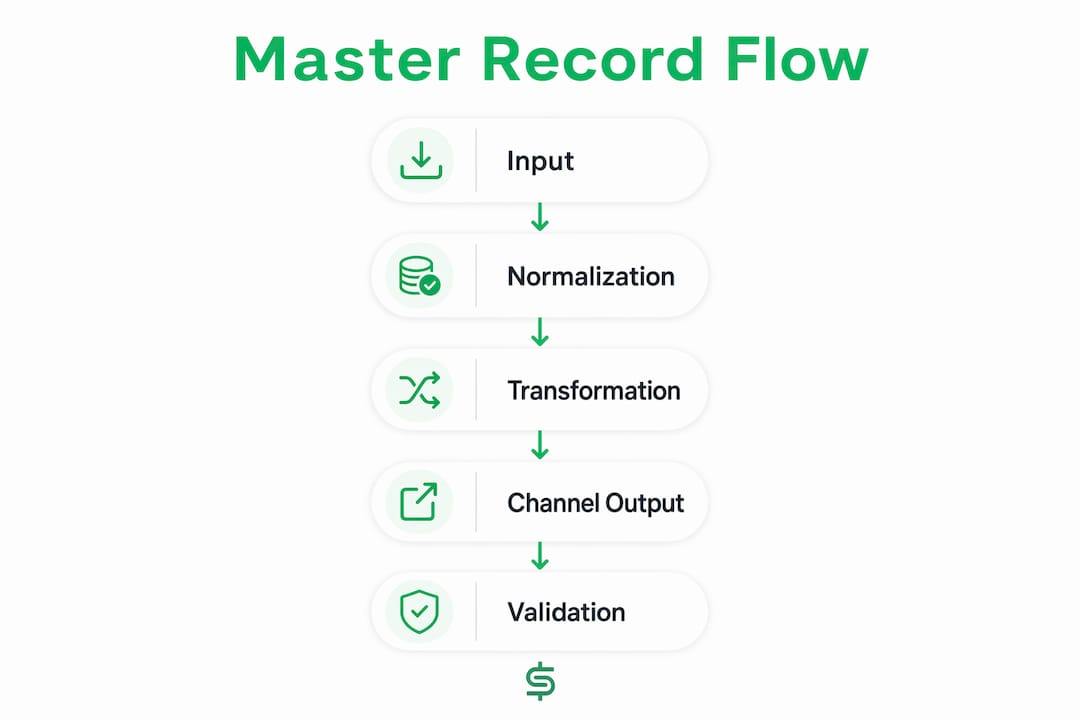
Feed transformation rules handle unit conversions, character limits, and category mapping automatically. If Amazon needs a title under 200 characters, the rule truncates and reformats. If Walmart needs a shelf description under 500 characters, the rule generates one from your master description. Compliance becomes structural, not a manual checklist item.
Pro Tip: Run automated schema validation before every feed push. A simple check that flags missing required fields, character-limit violations, and null image URLs catches 80% of suppression-causing errors before they reach any channel.
How do you adapt your master record for each marketplace?
Each channel has its own rules, and the goal isn’t to write five separate listings. It’s to write one master record and let transformation templates do the per-channel work, with override values for the cases where a channel genuinely needs something different.
Channel-by-channel mapping principles:
- Amazon: Front-load the primary keyword in the title. Use backend search terms aggressively. Build A+ content for both visual storytelling and structured data. Title formula: Brand + Product + Feature + Size + Color, max 200 characters.
- Walmart: Fill every available product attribute. Walmart’s algorithm weights attribute completeness heavily, so a truncated Amazon feed import will underperform. Use Walmart’s Item Spec sheets directly. Differentiate pricing or bundle configuration to avoid price-parity flags.
- eBay: Keywords in the title carry most of the ranking weight. Front-load the most searchable terms. eBay’s item specifics fields are critical for search filtering, so map every applicable attribute from your master record.
- Etsy: Use all 13 tag slots with long-tail descriptive phrases. Titles should read naturally and include craft, material, and use-case language. Lifestyle photography is an algorithmic signal, not just a nice-to-have.
- Shopify: Titles are SEO titles for Google as much as for Shopify’s internal search. Keep them under 70 characters for clean display in search results. Use metafields to store structured data that doesn’t fit the standard product template.
Platform constraints at a glance:
- Never use identical pricing across channels. Walmart will suppress listings priced higher than the same item on Amazon.
- Walmart requires pure white backgrounds for main images. Etsy rewards lifestyle and context imagery.
- Amazon’s title must contain no promotional text (“Best Seller,” “Sale,” “Free Shipping”).
For channel-specific needs that differ from your standard transformation output, create override values in the master record. An eBay title might need different keyword ordering than an Amazon title because the search algorithms prioritize different terms. Store the override in the master record so it still propagates through the system rather than being edited directly in the channel dashboard.
Pro Tip: Test every new transformation template in a staging environment with 5–10 SKUs before pushing to live listings. A single malformed transformation rule can corrupt hundreds of listings simultaneously.
What image and asset strategy works across multiple channels?
Images are where channel-specific requirements diverge most sharply, and where a one-size-fits-all approach costs you the most ranking equity. The right strategy keeps a universal canonical image set and derives channel-specific variants from it.
Universal images (use everywhere):
- Hero shot on a pure white background, minimum 1,500 × 1,500 pixels
- Multiple-angle shots showing all sides of the product
- Dimension or scale reference shot
Channel-specific images:
- Lifestyle and context shots for Etsy and Poshmark (show the product in use, in a real environment)
- Infographic overlays with key specs for Amazon A+ content
- Detail/close-up shots for fashion and collectibles on eBay
Image spec checklist by platform:
- Amazon: minimum 1,000px on the longest side, pure white background for main image, up to 9 images
- Walmart: pure white background required for main image, minimum 1,000 × 1,000px, up to 10 images
- Etsy: minimum 2,000px on the longest side, 8–10 images including lifestyle shots for best ranking
- eBay: minimum 500px, white or neutral background preferred, up to 24 images
File naming and metadata:
Use a consistent naming convention: [SKU]-[channel]-[shot-type]-[sequence].jpg. For example, ABC123-amazon-hero-01.jpg. This makes automated transformation pipelines reliable because the system can locate and assign the correct image by parsing the filename rather than relying on manual selection.
Pro Tip: Maintain a canonical image library with the highest-resolution originals, then generate channel-specific derivatives (resized, background-removed, or cropped) from those originals. Never start from a derivative when creating another derivative — quality degrades and dimensions drift.
How should you roll out AI and automation without breaking things?
AI listing tools can draft titles, suggest category mappings, fill attribute fields from product descriptions, and flag images that don’t meet platform specs. What they can’t do reliably is make judgment calls about brand voice, catch subtle compliance edge cases, or know when a product belongs in a non-obvious category. That’s still your job.
What AI handles well:
- Generating title drafts from a product description or barcode scan
- Suggesting eBay item specifics from product attributes
- Flagging character-limit violations before feed push
- Recommending price bands based on comparable listings
What still needs human review:
- Final approval on high-margin or high-visibility SKUs
- Category selection for products that span multiple taxonomies
- Brand voice and tone in descriptions
- Compliance flags for regulated product categories
A gradual rollout plan:
- Pilot phase (weeks 1–2): Run AI drafting on 10–20 low-risk SKUs. Review every output manually before pushing live. Note the error patterns.
- Partial automation (weeks 3–6): Expand to 50–100 SKUs. Auto-approve outputs that pass schema validation; flag exceptions for human review.
- Full automation with approval gates (week 7+): Automate the full catalog with a mandatory human approval step for new listings and a spot-check sample for updates.
Common failure modes to watch for:
- AI-generated titles that exceed character limits after variable substitution
- Category mismatches that place a product in a lower-traffic browse node
- Image suggestions that don’t meet the channel’s background requirements
- Price recommendations that violate your floor pricing rules
Pro Tip: Keep manual approval active for your top 20% of SKUs by revenue, permanently. The time cost is minimal; the protection against a bad automated push on a high-visibility listing is worth it every time.
How do you keep inventory and pricing synchronized across channels?
Inventory is where multi-channel operations break down fastest. Oversell on one channel, stockout on another, and you’re looking at account health penalties, negative reviews, and suppressed rankings across the board simultaneously.
The two-layer inventory architecture is the operational standard for reducing oversell risk. Layer 1 is your primary fulfillment channel (FBA for Amazon, WFS if Walmart is your second channel by volume). Layer 2 is a 3PL or in-house pool for cross-channel fulfillment. Keeping these layers separate means a stockout in your FBA pool doesn’t automatically zero out your eBay or Etsy availability.
Per-channel pricing rules:
- Set a pricing floor per SKU per channel that accounts for platform fees, fulfillment costs, and your minimum acceptable margin.
- Never price identically across all channels. Walmart suppresses listings priced higher than the same item on Amazon. Use bundle configurations or exclusive SKU variants to differentiate where needed.
- Set repricing bands (a floor and a ceiling) rather than a fixed price. This gives repricing tools room to compete without violating parity rules or destroying margin.
Margin-decision checklist for cross-listing a SKU:
- Does the channel fee structure leave at least a few margin points after fulfillment?
- Is there genuine demand signal on this channel for this product category?
- Can you fulfill from your Layer 2 pool without cannibalizing Layer 1 inventory?
- Does the SKU require a channel-specific bundle or pricing variant to avoid parity suppression?
Pro Tip: Segment your catalog by channel rather than listing everything everywhere. High-velocity, low-margin SKUs stay on Amazon FBA. Unique bundles go to Walmart. Handmade or limited-run variants go to Etsy. This reduces channel cannibalization and gives each platform a reason to promote your listings organically.
What does a realistic implementation timeline look like?
For most sellers, the full setup from catalog audit to live multi-channel automation takes 30–90 days depending on catalog size and team capacity. Here’s how to sequence it.
30/60/90-day milestones:
- Days 1–30: Catalog audit, master record template creation, and data cleanup. Map all required fields for your target channels. Identify SKUs with missing images, inconsistent UPCs, or incomplete attributes.
- Days 31–60: Build transformation rules for your first two channels. Run a pilot with 20–50 SKUs. Set up staging and change-log tracking. Validate outputs manually before pushing live.
- Days 61–90: Expand to full catalog on pilot channels. Add a third channel if the first two are stable. Configure automated alerts for feed failures and listing suppressions.
Numbered rollout steps:
- Export your full catalog and identify the superset of fields required across all target channels.
- Build the master record template in your OMS, PIM, or a structured spreadsheet.
- Write transformation rules for Channel 1. Test with 10 SKUs in staging.
- Push the pilot SKU set live. Monitor for suppressions, attribute errors, and price flags for 48 hours.
- Expand to the full catalog on Channel 1. Document the change log.
- Repeat steps 3–5 for Channel 2.
- Configure inventory sync between your master record and all active channels.
- Set up automated QA alerts (feed failures, price deviations, suppression triggers).
High-level cost buckets:
- Tools and subscriptions: Listing management software, feed automation tools, and image editing subscriptions. Costs vary widely by catalog size and feature set.
- Image production: Separate image sets per channel add up. Budget for a photography session if your current assets don’t meet all platform specs.
- Initial setup time: Expect 20–40 hours of setup work for a catalog under 200 SKUs, more for larger catalogs.
Timeline by catalog size:
- Under 200 SKUs: 3–4 weeks to full operation with one person dedicated part-time.
- 200–2,000 SKUs: 6–10 weeks with a small team or consultant support.
- 2,000+ SKUs: 10–16 weeks minimum; PIM or ERP integration likely required.
Pro Tip: For sellers above $1M in annual revenue, a three-channel operational ceiling is the realistic sweet spot. Three channels managed well outperforms five channels managed poorly, every time.
What QA checks keep listings consistent after you go live?
Going live is not the finish line. Listings drift, feeds fail silently, and marketplace policy updates change required attributes without notice. A recurring QA regimen catches these problems before they become revenue losses.
Regular QA checklist (run weekly for top SKUs, monthly for the full catalog):
- Attribute completeness: are all required fields populated on every channel?
- Image sets: does each listing have the correct number of images in the correct format?
- Price parity: are any listings priced in a way that could trigger Walmart or Amazon suppression?
- Category mapping accuracy: have any listings been auto-recategorized by the platform?
- Inventory sync: does the available quantity in your master record match what each channel shows?
Alert triggers to configure:
- Sudden price deviation of more than 5% from your master price (indicates a direct channel edit or a repricing tool running outside its band)
- Feed push failures (the job ran but zero records updated)
- Listing suppression events (the platform removed a listing from search)
- Inventory mismatch above a threshold (e.g., more than 10 units difference between master and channel)
Common operational pitfalls:
- Editing a listing directly in a channel dashboard instead of the master record. The fix: lock down channel-level edit permissions and route all changes through the master catalog.
- Letting a feed schedule slip during peak season. The fix: set redundant feed schedules and alert on missed runs.
- Ignoring marketplace policy update emails. The fix: assign one person to review policy update digests weekly.
Centralized listing normalization plus automation reduces manual edits and prevents listing drift. Systems that expose preview/staging and change logs are required to maintain control at scale.
Pro Tip: Run weekly diffs for your top-revenue SKUs and configure automated rollback for failed feed pushes. A rollback that restores the last known-good state in under five minutes is worth more than any manual recovery process.
How does SpareDollar address the checklist items above?
SpareDollar maps directly to the operational framework described throughout this guide. It’s built specifically for eBay sellers who want to list once and push to multiple channels without losing control of what goes live.
Feature-to-problem mapping:
| Challenge from this guide | SpareDollar feature |
|---|---|
| Building and maintaining a master product record | Single listing creation with all fields stored centrally |
| AI-assisted title and description drafting | AI drafting for eBay item specifics and descriptions |
| Per-channel pricing rules | Per-channel pricing with floor and ceiling controls |
| Preventing oversells | Inventory sync with auto-delist on sale |
| Image variant management | Supports multiple image uploads per listing |
| Staging and preview before going live | Preview before push; seller approves before anything goes live |
| Cross-listing to multiple channels | Multi-marketplace crosslisting from a single listing |
| Importing existing listings | Free imports from eBay, Poshmark, Depop, Mercari, and Shopify |
| Pricing guidance | Price recommendations based on comparable listings |
| Analytics | Sales and profit analytics per channel |
Practical use-case notes:
- A seller with 150 eBay SKUs can import their existing listings into SpareDollar, let the AI fill in missing item specifics, set per-channel pricing floors, and push to additional channels in a fraction of the time manual cross-listing would take.
- The auto-delist on sale feature prevents the oversell scenario that triggers account health penalties. When a unit sells on one channel, SpareDollar removes or updates the listing on all others automatically.
- The staging and preview workflow means no listing goes live without seller sign-off. That’s the manual approval gate this guide recommends for high-margin SKUs, built into the product by default.
SpareDollar offers a free trial, so you can test the workflow against your actual catalog before committing to a subscription. The eBay-specific features are particularly strong for sellers managing item specifics at scale. Think of it as your master catalog with a built-in transformation engine. (And unlike your spreadsheet, it won’t crash when you add column 47.)
Key Takeaways
A master product record with transformation rules, automated feed sync, and staged approvals is the most reliable system for keeping uniform product listings accurate and sales-ready across every channel.
| Point | Details |
|---|---|
| Master record first | Build one canonical product record before touching any channel; channels consume data, they don’t produce it. |
| Transformation rules handle compliance | Per-channel rules for character limits, units, and category mapping eliminate manual reformatting and suppression risk. |
| Two-layer inventory architecture | Separate primary fulfillment from your cross-channel pool to prevent oversells from cascading across all active channels. |
| Three-channel ceiling for most sellers | For sub-$5M sellers, three well-managed channels outperform five poorly managed ones. |
| SpareDollar as the implementation path | SpareDollar’s AI drafting, per-channel pricing, inventory sync, and auto-delist features map directly to this guide’s checklist. |
The part most sellers skip until it’s too late
The conventional wisdom on multi-channel selling is that more channels equal more revenue. Add Amazon, add Walmart, add Etsy, add eBay, and watch the numbers climb. That framing is wrong in a specific and costly way.
More channels equal more surface area for inconsistency. Every channel you add is another place where your listings can drift, your inventory can go out of sync, and a policy update can suppress your products without warning. The sellers who scale multi-channel operations successfully aren’t the ones who move fastest. They’re the ones who build the master catalog infrastructure before they expand, not after.
The other thing experienced sellers know: set-it-and-forget-it is a myth in this space. A listing that ranked well six months ago may be suppressed today because a required attribute was added to the platform’s taxonomy. A price that was compliant last quarter may now trigger a parity flag because a competitor dropped their price on another channel. Ongoing monitoring isn’t optional maintenance. It’s the actual job.
One practical lesson worth internalizing: limit active channels to three until each one is genuinely healthy. That means consistent rankings, clean account health metrics, and positive margin after all fees. Adding a fourth channel on top of three struggling ones doesn’t fix the struggling ones. It just gives you a fourth place to have problems.
SpareDollar cuts the listing work without cutting your control
Managing consistent eCommerce listings across multiple marketplaces doesn’t have to mean a spreadsheet the size of a small country and a daily panic about what went live where. SpareDollar gives eBay sellers a single place to build a listing, let AI handle the tedious parts (item specifics, description drafts, price recommendations), set per-channel pricing rules, and push to multiple marketplaces with a preview before anything goes live.
The free trial lets you test the full workflow against your real catalog. No long-term commitment required. Start with SpareDollar and see how many listings you can get live before your coffee gets cold. Check the pricing page for subscription tiers and one-time listing credit options.
Useful sources
- How to Build a Profitable Multichannel Marketplace Strategy in 2026 — Ecommerce Times: covers channel selection, inventory architecture, pricing parity, and SKU segmentation strategy.
- Product Data Normalization for Multi-Channel Ecommerce — Nventory: the definitive technical reference for master catalog structure, transformation rules, and field-level channel mapping.
- Multi-Channel eCommerce 2026: Unified Selling Guide — Digital Applied: covers centralized normalization, staging, change logs, and automation controls.
- Microsoft Partner Center: Marketplace Criteria and Content Validation: primary reference for marketplace content standards and validation requirements.
FAQ
What does “consistent listings across marketplaces” actually mean?
It means every channel shows the same core product data (title, description, images, price, inventory) derived from a single master record, with only channel-required formatting differences applied via transformation rules.
How long does it take to set up a master catalog for multi-channel selling?
A catalog under 200 SKUs typically takes 3–4 weeks with one person working part-time. Catalogs of 200–2,000 SKUs generally require 6–10 weeks with a small team or consultant support.
What causes listing suppression on Amazon and Walmart?
Amazon suppresses listings that are missing required attributes, exceed title character limits, or lack backend keywords. Walmart suppresses listings with incomplete attributes or prices higher than the same item on a competing channel.
Can SpareDollar help prevent oversells across channels?
Yes. SpareDollar’s inventory sync and auto-delist on sale feature removes or updates listings on all connected channels when a unit sells, preventing the oversell scenarios that trigger account health penalties.
How many channels should a seller manage at once?
For most sellers below $5M in annual revenue, three well-managed channels is the practical ceiling. Adding more channels before the existing ones have clean account health and positive margin tends to spread operations too thin to manage effectively.