The fastest way to increase eBay sales is to fix what buyers see first: your title, your photos, and your price. Get those three right, and everything else compounds. Get them wrong, and no amount of promotion will save you.
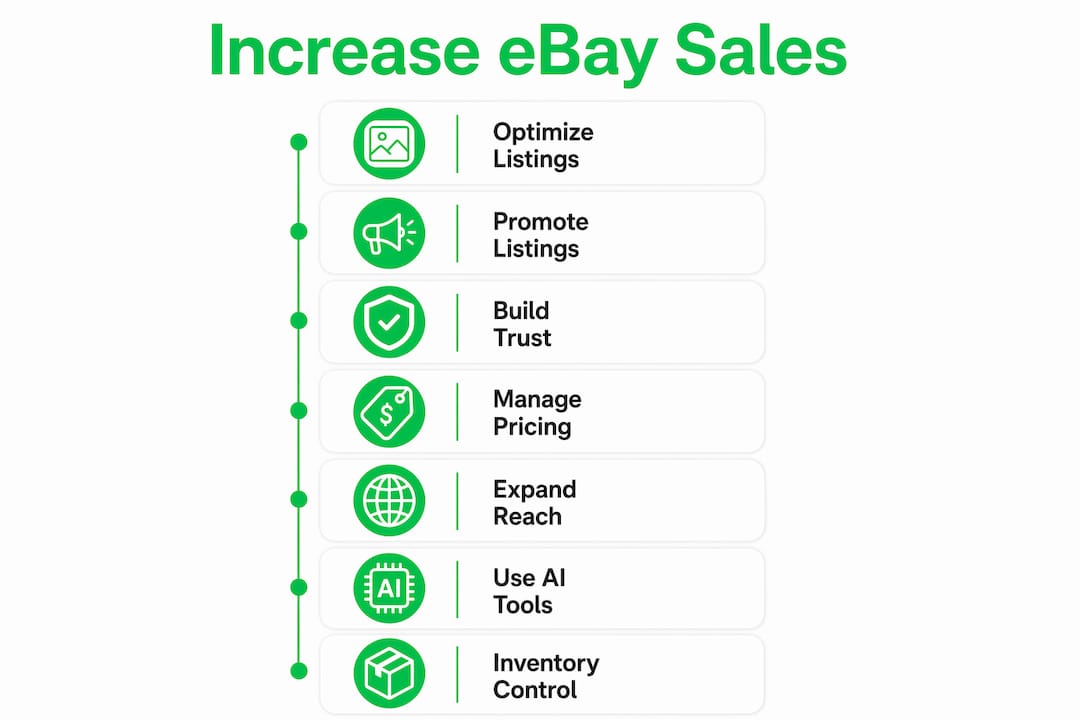
Here is what actually moves the needle in 2026:
-
Listing optimization drives both search visibility and conversion rate, and it costs nothing to do.
-
Promoted Listings can boost impressions by 36% and generate 15–25% more sales on top-performing products.
-
Top Rated Seller status improves your placement in search and cuts your final value fees.
-
Smart pricing with free shipping, bundles, and Best Offer captures buyers at every stage of the decision process.
-
International and mobile reach opens your listings to a much larger pool of buyers than domestic-only, desktop-only selling ever will.
These are not abstract tips. Each one below comes with a specific action you can take today.
Table of Contents
-
1. Optimize your eBay listings for maximum sales performance
-
2. Boost visibility with eBay Promoted Listings and Seller Hub tools
-
5. Expand your eBay market reach with international sales and mobile optimization
-
6. Leverage AI-powered tools to simplify multi-channel selling
1. Optimize your eBay listings for maximum sales performance
Listing optimization is the single highest-leverage activity for sellers who want to sell faster on eBay. Better titles rank higher. Better photos convert more clicks into purchases. Better descriptions answer the questions that would otherwise stop a buyer from committing.

Titles: Use all 80 characters. Lead with the product type and its most searched attributes, then layer in brand, size, color, material, and model number. Type your product into eBay’s search bar and watch the autocomplete suggestions. Those are real buyer searches. Use them. Skip filler words like “look” or “wow” — they waste characters and confuse the algorithm.
Photos: eBay gives you 24 free photo slots. Fill them. Shoot every angle, every detail, every flaw if the item is used. Clean backgrounds and natural or studio lighting signal professionalism to buyers who cannot touch the product before buying. Size comparison shots and packaging photos reduce return rates because buyers know exactly what they are getting.
Descriptions: Write for the buyer, not for yourself. Lead with benefits, not a spec sheet. Use bullet points for scannability, and weave in three to five keywords naturally. Answer the questions buyers actually ask: Does it fit a 2019 model? Is the color closer to navy or royal blue? What is included in the box?
Item specifics and categories: These fields feed eBay’s search filters. A buyer searching for “women’s size 8 running shoes” in the Athletic Shoes category will never see your listing if you left those fields blank. Complete every applicable field, even the ones that feel redundant.
Freshness: eBay’s algorithm lowers stale listings in search results after 30 days, even on auto-renewed listings. A small change to the price, title, or a photo can reset that signal. Do it regularly.
Pro Tip: Instead of letting a listing auto-renew, use “Sell Similar” to create a new listing. This generates a new Item ID and listing date, which boosts impressions by 20–35% compared to passive renewal. Auto-renew keeps the original date. eBay’s algorithm sees the difference.
2. Boost visibility with eBay Promoted Listings and Seller Hub tools
Promoted Listings are the most direct way to increase eBay listing visibility without waiting for organic rank to climb. You pay only when a buyer clicks your promoted listing and then purchases within 30 days, making it a low-risk spend compared to most paid advertising.
The Standard tier charges 2–20% of the sale price, depending on the category and the ad rate you set. Higher rates win more placements, but the sweet spot is usually the category’s suggested rate, which eBay surfaces in Seller Hub. Going well above it rarely produces proportional returns.
A few things worth knowing about how promotion actually works:
-
Promoted Listings primarily drive sales velocity, which then feeds your organic ranking indirectly. They do not directly alter where you appear in unpaid search. Think of them as a way to earn the sales history that earns the organic rank.
-
Apply promotions to your top-converting products first. A listing with weak photos and a vague title will not convert at a higher rate just because it is promoted.
-
Use Seller Hub’s campaign analytics to track your ad spend against revenue. If a promoted listing is generating clicks but not sales, the problem is usually the listing itself, not the budget.
-
Seasonal timing matters. Running promotions during eBay’s own sales events gives your listings additional exposure through eBay’s marketing channels.
3. Build trust and credibility to raise buyer confidence

Buyers on eBay cannot inspect your item in person. Everything they know about you comes from your feedback score, your seller status, your photos, and how you communicate. Trust is not a soft metric. It directly determines whether a buyer picks your listing or the one next to it.
Feedback: Ask for it, but do it right. A brief, friendly message after delivery, thanking the buyer and inviting them to reach out with any questions, prompts more positive reviews than a generic automated request. When you receive a negative, respond quickly and professionally. A calm, solution-focused reply visible to future buyers often does more for your reputation than the negative itself damages it.
Top Rated Seller status: This is eBay’s clearest trust signal. To qualify, you need $1,000+ in sales and 100+ transactions over 12 months, a defect rate below 0.5%, and late shipments below 3%. Hit those thresholds and you get a badge on your listings, better search placement, and lower final value fees. The defect rate is the one that trips sellers up most often. Resolve disputes before they escalate to eBay cases.
Returns and shipping: A 30-day return policy reduces buyer anxiety enough to lift conversion rates meaningfully. Build the return cost into your pricing rather than absorbing it as a surprise loss. Fast, affordable shipping with tracking is non-negotiable. Buyers who cannot see a delivery estimate will often skip your listing entirely.
Pro Tip: When a buyer leaves negative feedback, your public response is read by every future buyer who checks your profile. Keep it short, factual, and solution-oriented. Defensive or combative replies cost you more sales than the original negative ever would.
4. Effective pricing and returns management strategies
Pricing on eBay is not about being the cheapest. It is about being the most compelling value at the moment a buyer is ready to decide.
Start with sold listings, not active ones. Filter eBay’s completed listings by condition and category to see what buyers actually paid, not what sellers hoped to get. That is your real market price. Active listings tell you what your competition is asking. Sold listings tell you what works.
From there, a few tactics consistently raise order value and conversion rate:
-
Free shipping: eBay’s algorithm favors listings with free shipping. Build the cost into your item price. Buyers see “free” and respond to it even when the math is identical to a separate shipping charge.
-
Bundle and volume deals: eBay’s built-in multi-buy discount tool lets you offer tiered pricing, like 10% off two items or 15% off three. Buyers who were going to purchase one unit often upgrade when the deal is right in front of them.
-
Best Offer: Enabling Best Offer on fixed-price listings attracts buyers who want to negotiate. You can set auto-accept and auto-decline thresholds so you are not manually reviewing every offer. It also gives you data on what buyers are actually willing to pay.
-
Markdown Manager: Use it for slow-moving inventory and during eBay’s seasonal sales events. A time-limited discount creates urgency. Buyers who have been watching a listing for weeks will often pull the trigger when the price drops.
The returns side of pricing is equally strategic. A free returns policy builds buyer confidence and can improve your search ranking. The key is pricing products to absorb the occasional return without hurting your margin, rather than avoiding returns policies and losing buyers who want that safety net.
5. Expand your eBay market reach with international sales and mobile optimization
Domestic-only selling is a ceiling. Removing it is one of the simplest ways to improve eBay sales without changing a single listing.
eBay’s Global Shipping Program handles customs, duties, and international logistics on your behalf. You ship to eBay’s domestic hub, and they take it from there. The risk of international shipping complications falls on eBay, not you. For most sellers, this is the easiest way to open up dozens of new markets overnight.
When you do sell internationally, price competitively for each market. Currency conversion and local shipping expectations vary. A price that feels fair to a US buyer may look expensive to a buyer in the UK or Australia once they factor in conversion rates.
Over 60% of eBay purchases happen on mobile devices. That number should change how you write every description. Long paragraphs that look fine on a desktop become walls of text on a phone screen. Use short sentences, bullet points, and white space. Your first photo needs to work as a thumbnail at 200 pixels wide, because that is what a mobile buyer sees in search results before they ever tap your listing.
Social media is an underused traffic source for eBay sellers. Sharing listings to Instagram, Facebook, or Pinterest drives buyers who were not already on eBay searching for your product. It is particularly effective for niche or collectible items where communities already exist around the product category.
6. Leverage AI-powered tools to simplify multi-channel selling
The sellers who grow fastest on eBay are not the ones who work the hardest manually. They are the ones who automate the repetitive parts and redirect that time toward strategy.
AI-assisted listing tools change the economics of selling at scale. Instead of writing each title and description from scratch, you describe the product or scan its barcode, and the AI drafts a keyword-optimized listing. You review, adjust, and publish. The quality is consistent, the keywords are researched, and the time per listing drops significantly.
Multi-channel selling multiplies the impact of every listing you create. Cross-listing top-performing eBay products on Amazon and Walmart can generate 60–90% more revenue from existing inventory with minimal additional effort. The challenge has always been keeping inventory synced across platforms. Sell one unit on eBay, and it needs to delist automatically everywhere else. Without automation, that sync is a full-time job.
SpareDollar is built specifically for this workflow. You create one listing with AI-assisted drafting, and SpareDollar distributes it to eBay, Shopify, Etsy, Poshmark, and other platforms simultaneously. Inventory syncs automatically. When something sells, it delists everywhere. You set per-channel pricing, maintain brand consistency, and manage everything from one dashboard.
-
Barcode scanning speeds up product input for resellers working with large volumes of similar items.
-
Bulk actions let you update prices or relist across your entire catalog without touching each listing individually.
-
Sales and profit analytics surface which SKUs are actually making money versus which ones just look busy.
Pro Tip: Use SpareDollar’s AI drafting to create your eBay listing first, then push it to additional channels with per-channel price adjustments. You capture the eBay-specific keyword optimization while pricing each marketplace to its own competitive reality.
7. Inventory management best practices
Effective sellers treat inventory as a dynamic database, not a static list of things they own. The difference shows up in sales velocity.
The core discipline is knowing what is selling, what is stalling, and what to do about each. Pull your sales data weekly. Identify which SKUs are moving and which have not had a view in two weeks. Stalling inventory is not just a missed sale. It is capital sitting idle that could be redeployed into faster-moving products.
A few practices that separate high-volume sellers from casual ones:
-
Batch your listings. Adding inventory in scheduled batches, rather than one item at a time whenever you feel like it, keeps your account activity consistent. eBay’s algorithm rewards sellers who list regularly.
-
Test promotions on slow movers. Before dropping the price on a stalling item, run a short Promoted Listings campaign or a markdown event. Sometimes the item is priced right but simply lacks visibility. A promotion costs less than a permanent price cut.
-
Set reorder triggers. For sellers who source from suppliers, track sell-through rates and set minimum stock thresholds. Running out of a top-performing SKU is a preventable revenue loss.
-
Audit your catalog quarterly. Items that have not sold in 90 days despite price adjustments and promotions are usually priced wrong, photographed poorly, or simply not in demand. Cut them or relist with a completely fresh approach.
Inventory management and listing freshness are connected. An item that has been sitting for 60 days with no updates is invisible to eBay’s algorithm. Refreshing it, repricing it, or relisting it with “Sell Similar” resets that clock.
Key Takeaways
Consistent listing optimization, strategic use of Promoted Listings, and automated multi-channel distribution are the three levers that most reliably increase eBay sales at scale.
| Point | Details |
|---|---|
| Listing freshness matters | Listings older than 30 days lose search visibility; use “Sell Similar” to reset the algorithm clock. |
| Promoted Listings pay off | Promoted Listings increase item impressions by 36%, resulting in 15–25% more sales when applied to top-converting products. |
| Trust drives conversion | Top Rated Seller status requires a defect rate below 0.5% and late shipments below 3%. |
| Mobile and global reach | Over 60% of eBay purchases happen on mobile; the Global Shipping Program opens international markets with minimal added risk. |
| SpareDollar for scale | SpareDollar lets you create one AI-drafted listing and distribute it across eBay and multiple other marketplaces with automatic inventory sync. |
SpareDollar cuts the time between listing and selling
Most sellers who want to sell faster on eBay hit the same wall: the listing process itself. Writing optimized titles, filling item specifics, uploading photos, then repeating that across multiple platforms manually is the bottleneck that keeps good inventory sitting unsold.

SpareDollar removes that bottleneck. You list once with AI-assisted drafting that handles keyword optimization and item specifics automatically. Then SpareDollar pushes that listing to eBay and every other marketplace you sell on, with per-channel pricing you control and inventory that syncs the moment something sells. No duplicate work. No overselling. No stale listings sitting on a platform you forgot to update.
It is built for active eBay sellers who are already moving inventory and want to do more of it without adding hours to their day. The analytics and features show you which listings are performing and which need attention, so you are making decisions based on real data rather than guesswork.
Start your free trial at sparedollar.io and see how much faster your listings go live.