
The fastest reliable way to map categories across marketplaces is a three-layer stack: AI-generated category suggestions for speed, saved mappings for consistency, and attribute-based rules for the exceptions that trip up automation. Each layer covers what the other two miss. AI handles volume, saved mappings stop you from re-solving the same problem twice, and rules catch the edge cases that live inside the Amazon Browse Tree Guide and Walmart’s Product Type Groups.
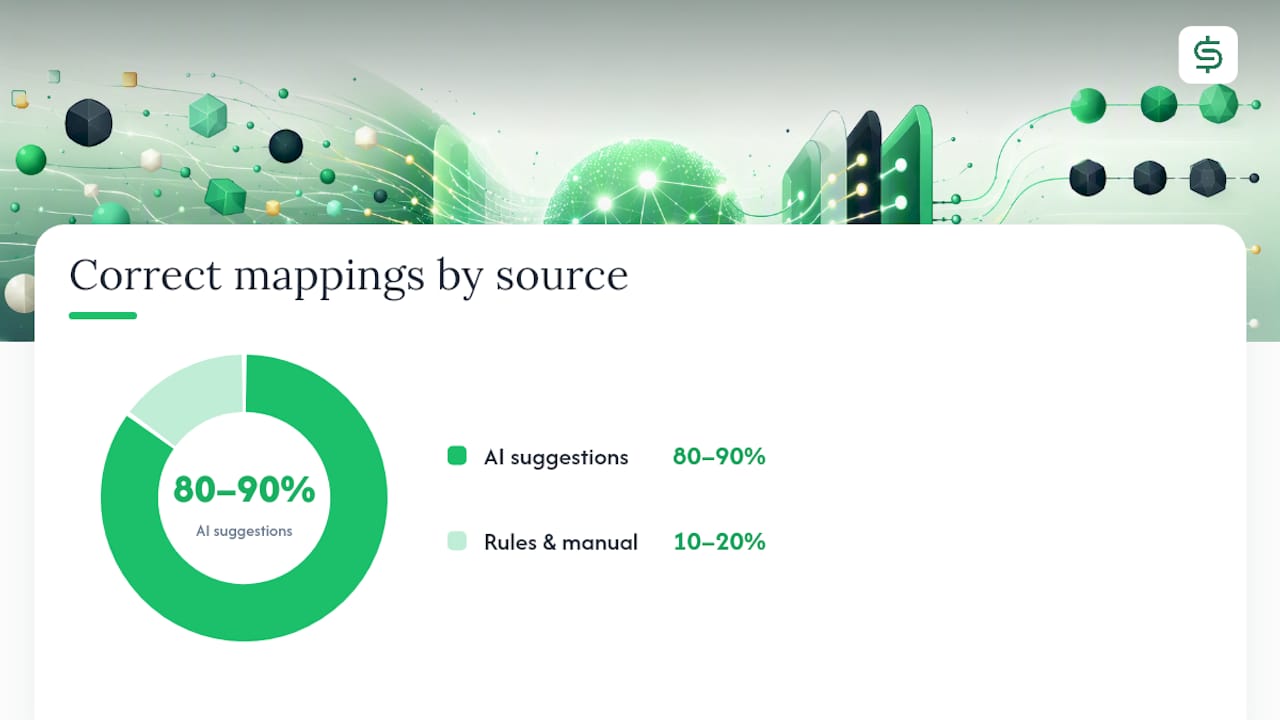
- AI suggestions get you 80 to 90 percent of products placed correctly on the first pass.
- Saved mappings turn a one-time decision into a permanent rule for that source category.
- Attribute rules catch brand exceptions, size variants, and region-specific quirks AI tends to miss.
Pro Tip: Run your first 50 AI-suggested mappings manually reviewed before you trust bulk-accept on anything. Confidence scores lie sometimes, and one bad mapping copied across 200 SKUs is a bad afternoon.
Key Takeaways
Accurate cross-marketplace category mapping depends on combining AI suggestions, saved mappings, and attribute-based rules rather than relying on any single method alone.
| Point | Details |
|---|---|
| Layer your approach | Use AI for speed, saved mappings for consistency, and rules for exceptions. |
| Start conservative | Set high confidence thresholds for AI acceptance until accuracy is proven. |
| Prioritize strict marketplaces | Get Amazon Browse Tree Guide and Walmart Product Type Group requirements right first. |
| Audit on a schedule | Review active SKUs monthly and older catalogs quarterly, plus after taxonomy updates. |
| Use a purpose-built tool | SpareDollar applies saved mappings and AI-assisted drafting across marketplaces from one listing. |
Table of Contents
- How Does AI-Powered Category Mapping Work?
- When Should You Map Categories Manually?
- How Do Attribute Rules Handle Mapping Exceptions?
- How Do You Create and Save Mappings for Reuse?
- How Often Should You Audit Category Mappings?
- What Are the Best Practices for Accurate Category Mapping?
- Why Do Marketplace Category Rules Differ So Much?
- Where SpareDollar Fits Into Your Mapping Workflow
- Sources
- FAQ
How Does AI-Powered Category Mapping Work?
AI category mapping tools read the same signals a human categorizer would: title, bullet points, specs, description text, and sometimes the product image. From that, the system returns a top suggestion, a handful of alternatives, and a matching score that tells you how confident it is. ChannelEngine’s breakdown of the process shows this is exactly how it speeds up onboarding when sellers connect a new catalog to a new sales channel.
The workflow in practice looks like this:
- Generate suggestions for the full batch of unmapped products.
- Filter by confidence score, or by suggested category, to separate the easy wins from the judgment calls.
- Bulk-accept everything above your confidence threshold.
- Manually review anything that falls below it.
- Save the accepted mappings so future products in that same source category map automatically next time.
That last step matters more than people give it credit for. Marketplacer’s documentation on AI category mapping walks through exactly how confirmed mappings get reused, which is what turns a one-time cleanup project into a system that keeps working after you close the laptop.
Pro Tip: Set your acceptance threshold conservative at first, say 90 percent confidence or higher. You can loosen it once you’ve watched a few hundred mappings hold up without generating support tickets or listing blocks.

When Should You Map Categories Manually?
Manual mapping earns its keep on the products AI can’t confidently place: brand-new product types, oddball SKUs, private-label goods with no obvious parallel, or anything where the AI’s top suggestion and its runner-up sit close in confidence. Trust the machine on shirts and phone cases. Don’t trust it on a vintage typewriter repair kit.
The manual workflow, step by step:
- Filter your product list by “categorization required” or by confidence score below your threshold.
- Open each item and check the title, specs, and photo against the candidate categories.
- Choose the most specific leaf-level category available, not the broad parent node.
- Confirm the marketplace’s required attributes are filled before saving.
Filtering makes or breaks how fast this goes. Useful filters include:
- Suggested category (find everything the AI dumped into “Miscellaneous”)
- Source category (audit one category at a time)
- Brand (catch brand-specific attribute requirements)
- Confidence score range (isolate the borderline cases)
Amazon’s Browse Tree Guide ties leaf-node placement directly to visibility and badge eligibility, including “Best Seller” status. Walmart’s Product Type Groups work similarly. Miss a required attribute at the wrong node and the listing doesn’t rank poorly. It doesn’t publish at all.
How Do Attribute Rules Handle Mapping Exceptions?
Rules exist for the cases that repeat but don’t fit a single blanket mapping. A “men’s running shoes” source category might need to split three ways on the target marketplace depending on material, or a specific brand might always require a manual override because of licensing categories that don’t match your default logic.
Common rule types worth setting up:
- Attribute-based rules (size, material, color triggering a different subcategory)
- Brand-based overrides (a specific brand always routes to a specific node)
- Source-category exceptions (one source category splits into multiple targets)
- Region or country rules (the same product maps differently for a UK versus US listing)
Rule priority matters. A specific rule (this brand, this size) should always beat a general one (this source category). Most mapping tools resolve conflicts by specificity, but check yours. When a single SKU logically fits more than one marketplace category, that’s a genuine call between multi-category mapping (better discoverability, more filter matches) and single-category mapping (cleaner analytics, less risk of duplicate-listing flags).
Pro Tip: Test new rules on a sandbox channel or a 20 to 30 product sample before rolling them out to the full catalog. A typo in a rule condition can silently reroute hundreds of products overnight.
How Do You Create and Save Mappings for Reuse?
Creating a saved mapping is the step that keeps you from doing the same categorization work every single week. Once you’ve confirmed a mapping is accurate, tell the system to remember it.
The typical flow:
- Filter products by source category or by “confirmed” status.
- Select the confirmed items.
- Click “Create mapping” (or your platform’s equivalent).
- Confirm the target category and attribute set.
- Save it as the default for that source category going forward.
For catalogs in the thousands, bulk methods beat clicking through one product at a time:
- CSV import and export for offline review and batch corrections
- API endpoints for syncing mappings automatically as new products enter your feed
- Template-based mapping, which ExportYourStore’s category mapping lesson covers well for sellers running automated source-to-target workflows
Before you save anything, check three things: a sample size large enough to catch outliers (don’t trust five products), manual verification that the mapped attributes are actually filled in, and a second look at anything marked low-confidence. Saved mappings also feed back into the AI model itself, according to Marketplacer’s guidance, which means every correction you make now makes tomorrow’s suggestions a little sharper.
How Often Should You Audit Category Mappings?
Marketplace taxonomies aren’t static, and treating a mapping as “done” is how sellers end up with silently broken listings six months later. A reasonable cadence: monthly reviews for your active, fast-moving SKUs, and quarterly sweeps for older catalog segments that don’t change much.
Certain events should trigger an immediate audit instead of waiting for the calendar:
- A marketplace publishes a taxonomy update or renames categories
- A previously strong-selling listing suddenly drops in traffic or conversion
- You notice a spike in listings flagged for missing attributes
Track a small set of metrics to catch drift early: the percentage of mappings sitting in low-confidence territory, the count of listings blocked for missing required fields, and the mismatch rate between your source category and where it landed on the marketplace. Sellers using cross-marketplace demand and competition data to monitor category performance often catch a taxonomy shift before it shows up as a sales drop, simply because they’re already watching the numbers behind each category.
What Are the Best Practices for Accurate Category Mapping?
A short checklist beats a long lecture here. Run through this before you publish any batch of mapped listings:
- Always map to the most specific available node, never the broad parent category
- Fill every required attribute the target marketplace demands, not just the obvious ones
- Set conservative AI acceptance thresholds until your accuracy track record earns you room to loosen them
- Save mappings for any category you’ll see again, which is most of them
- Version-control your mapping rules so you can roll back a bad change
Pro Tip: Sample-test new mappings on a small batch before applying them catalog-wide. Vendor research on AI-driven taxonomy mapping points to real time savings when the system is properly tuned, but “properly tuned” means you checked it first, not that you trusted it blind.
Skip any of these and the consequence is usually the same: a blocked listing, a hidden listing that never shows up in the right filters, or clean-looking analytics that are quietly wrong because half your catalog landed in the wrong bucket.
Why Do Marketplace Category Rules Differ So Much?
Treating every marketplace the same is probably the single most common mistake in cross-listing, because the platforms genuinely don’t work alike. Amazon’s Browse Tree Guide rewards leaf-node precision and ties badge eligibility to it. Walmart leans on Product Type Groups with their own required-attribute sets. Target’s browsing structure is more top-down category oriented, which changes how forgiving it is of a slightly-off placement.
- Misclassification on Amazon can mean a listing loses Best Seller badge eligibility entirely.
- Missing a Walmart PTG attribute can block a listing from publishing at all.
- Wrong categories anywhere mean your analytics get contaminated with mismatched SKUs.
Between 80 and 90 percent of correctly mapped products come from AI-generated suggestions when the tuning is right, which leaves the harder platform-specific 10 to 20 percent for rules and manual review. If you’re prioritizing where to spend that manual attention, Amazon’s category structure and its effect on discoverability is worth understanding first. It’s also the marketplace where a mapping mistake costs you the most visibility.
Pro Tip: Prioritize the marketplaces with the strictest attribute requirements first when building out your mapping rules. Get Walmart and Amazon right, and eBay and Shopify feel easy by comparison.
A Few Notes From Running This in Practice
Balancing speed against accuracy is the whole game. Lean too hard on AI and you’ll ship a batch of mismatched listings before anyone notices. Lean too hard on manual review and you’ll never clear the backlog. Most teams split ownership: one person reviews AI suggestions daily, another owns the rule set and only touches it when a pattern of exceptions shows up.
Pro Tip: Pair your mapping audit with your weekly publishing cycle instead of running it separately. Catching a drifted mapping before Friday’s batch goes live is a lot cheaper than fixing it after 40 listings inherit the same mistake.
Where SpareDollar Fits Into Your Mapping Workflow
Here’s the thing about category mapping: doing it right once is easy. Doing it right across five marketplaces, every week, forever, is where sellers burn hours they don’t have. SpareDollar was built around that exact problem. You create one listing with AI-assisted drafting and automated item specifics, and SpareDollar handles distributing it across eBay and the other marketplaces you sell on, applying saved mappings so you’re not re-categorizing the same product type for the hundredth time.
That means faster onboarding when you’re adding a new sales channel, fewer listings blocked for missing attributes, and one central place to manage the mapping rules you’ve already built instead of scattering them across five different seller dashboards. You still get final say before anything goes live, which is the whole point. See how it works on the SpareDollar features page or start a free trial and map your first batch today.
Sources
A handful of resources cover the technical specifics this article only summarizes:
- The Guide to Product Taxonomy & Marketplace Mapping
- How to use AI Category Mapping to categorise products and create mappings – Marketplacer
- Market research (Sellersprite)
FAQ
What Is Category Mapping in Ecommerce?
Category mapping is matching your internal or source product category to the correct category on a marketplace like Amazon, eBay, or Walmart so the listing publishes with the right attributes and shows up in the right search filters.
How Accurate Is AI Category Mapping?
AI-generated suggestions typically place 80 to 90 percent of products correctly on the first pass, with the remainder needing manual review or a rule-based exception.
Should I Map One Product to Multiple Categories?
Map to multiple categories when a product genuinely fits more than one, since that improves discoverability, but default to a single specific category when you need cleaner analytics or the marketplace penalizes duplicate placement.
How Often Should Mappings Be Audited?
Review active, fast-moving SKUs monthly and older catalog segments quarterly, plus immediately after any marketplace taxonomy update.
Can a Tool Like SpareDollar Handle Category Mapping Automatically?
SpareDollar applies saved mappings and AI-assisted drafting when you distribute a single listing across multiple marketplaces, which cuts down on repeated manual categorization while still leaving final approval to you.