
Front-load your 80 characters with the highest-value keywords first, and you will immediately improve how eBay’s search algorithm matches your listing to buyer queries. Every strong title hits these fields:
- Brand (Nike, Sony, Levi’s)
- Product type (Running Shoes, Bluetooth Speaker, Jeans)
- Model or pattern (Air Max 270, WH-1000XM5, 501)
- Size or color (Men’s 10, Black, 32x30)
- Condition or qualifier (New, Used, Vintage, Bundle)
- One key modifier (Wireless, Waterproof, OG Box)
That’s your title in six fields. Everything else is optional filler.
Table of Contents
- How does eBay’s Cassini search rank listing titles?
- What should every eBay listing title include?
- What are eBay’s title character limits and formatting rules?
- Which tools help you find the right keywords for eBay titles?
- Before/after title examples and reusable templates
- How do you test title changes and when will you see results?
- Common title mistakes that kill your visibility
- Why titles get the click but your listing has to close the sale
- Key Takeaways
- The part of title optimization most sellers skip
- SpareDollar makes scaling your title strategy a lot less painful
- Useful sources
- FAQ
How does eBay’s Cassini search rank listing titles?
eBay’s search engine, Cassini, treats your listing title as the primary keyword signal. Keyword match in the title carries more weight than any other single factor in determining whether your listing surfaces for a given query. When a buyer types “Sony WH-1000XM5 Wireless Headphones Black,” Cassini scans titles first, then filters, then item specifics. If those words aren’t in your title, you’re invisible to that search, regardless of how good your photos or price are.
Beyond raw keyword matching, Cassini also weighs buyer behavior signals once your listing starts getting impressions. Click-through rate, conversion rate, and sell-through speed all feed back into ranking. A title that earns clicks but doesn’t convert (because the listing doesn’t match what the title promised) will actually hurt your ranking over time. Cassini is watching both ends of the funnel.
The signals Cassini uses, roughly in order of influence:
- Title keyword match — exact and partial matches to the buyer’s search query
- Keyword position — terms placed earlier in the title carry slightly more weight
- Item specifics — category fields like brand, condition, size, and color that filter results
- Click-through rate — how often buyers click your listing versus others in the same results
- Conversion rate — how often clicks turn into sales
- Recency — newly listed or recently revised listings get a short visibility boost
Pro Tip: Reconcile your title with your item specifics and photos before publishing. If your title says “New” but your photos show wear, or your item specifics say “Used,” Cassini’s conversion signals will penalize you. Consistency across all three is what keeps rankings stable.
What should every eBay listing title include?
The single most effective thing you can do is front-load the highest-value keywords: Brand first, then product type, then the details that narrow the match. Here’s the ordered checklist:
- Brand — Always first. “Nike,” “Apple,” “Vintage Levi’s.” Buyers filter by brand constantly.
- Product type — What is it? “Running Shoes,” “iPhone,” “Denim Jacket.” This is the noun that anchors the search.
- Key model or identifier — Model number, pattern name, edition. “Air Max 270,” “iPhone 14 Pro,” “501 Original.”
- Primary attribute — Size, color, material, or capacity. “Men’s Size 10,” “128GB,” “Navy Blue.”
- Condition or qualifier — “New,” “Used,” “Vintage,” “Lot of 3,” “Bundle.” Buyers filter by condition; match it.
- Secondary keywords — Anything left in your character budget: “OG Box,” “Wireless,” “No Reserve,” “Fast Ship.”
Do:
- Use the full 65–80 characters. Titles in that range are reported 2.1x more likely to sell than short, vague ones.
- Use buyer language, not seller language. Buyers search “women’s leather boots size 8,” not “gorgeous footwear.”
- Include model numbers and size specs. These are the long-tail terms that convert.
- Match your title to your item specifics and photos exactly.
Don’t:
- Use ALL CAPS for the whole title or random words. It looks like spam and wastes character weight.
- Add gimmicks like “L@@K,” “WOW!!,” or “MUST SEE.” eBay’s own guidance flags these as trust-reducers.
- Repeat the same keyword twice just to stuff it in. “Nike Shoes Nike Running Nike” helps no one.
- Include your store name, contact info, or promotional phrases like “Free Shipping” in the title field.
Weak title: NICE VINTAGE LEVI JEANS GREAT CONDITION LOOK!!!
Strong title: Levi's 501 Vintage Denim Jeans Men's 32x30 Medium Wash 90s USA Made
The second title hits brand, product type, model, size, condition context, and two secondary keywords. The first title hits nothing Cassini cares about.
What are eBay’s title character limits and formatting rules?
eBay allows up to 80 characters in a listing title. That’s your entire canvas. Use it.
The practical wrinkle is that not all 80 characters display everywhere. Mobile browsers typically truncate titles at around 50–60 characters, and Google Shopping usually shows only the first ~70 characters. That means the first 50–60 characters of your title need to carry the full weight of your keyword strategy. If “Vintage Levi’s 501 Jeans Men’s 32x30” fits in the first 55 characters, you’re covered on every surface. The remaining characters are bonus real estate for secondary terms.
| Character range | Where it displays | Priority |
|---|---|---|
| 1–55 characters | Mobile eBay, Google Shopping preview | Critical — put your top keywords here |
| 65–70 characters | Desktop eBay, full Google Shopping | High — secondary attributes and specs |
| 71–80 characters | Desktop eBay full title only | Lower — additional modifiers, condition notes |
Formatting rules to follow:
- Capitalize the first letter of each major word (Title Case). It reads cleanly and looks professional.
- Use standard abbreviations buyers actually search: “NWT” (New With Tags), “OEM,” “OG Box,” “W/” for “with.”
- Separate distinct attributes with spaces, not slashes or pipes, unless the slash is part of a model name.
- Never use excessive punctuation, asterisks, or symbols to draw attention.
Bad: *~*AMAZING VINTAGE LEVI JEANS 32X30 LOOK!!!*~*
Good: Levi's 501 Vintage Jeans Men's 32x30 Medium Wash 90s USA Made New
The bad example wastes 12 characters on symbols that Cassini ignores and buyers distrust. The good example uses every character on searchable terms.
Which tools help you find the right keywords for eBay titles?
The best keyword sources for eBay titles are already built into eBay itself. You don’t need to start with a paid tool.
- eBay autocomplete — Type your product into the eBay search bar and stop before hitting enter. The dropdown suggestions are real buyer queries, ranked by search volume. These are the exact phrases to build your title around.
The key discipline is relevance over volume. A high-volume keyword that doesn’t describe your item will drive clicks that don’t convert, which Cassini reads as a negative signal. Only include terms that accurately describe what you’re selling.
Pro Tip: When researching sold listings, sort by “highest price” within the sold filter. The highest-converting titles at premium prices often reveal which specific attributes (model number, original packaging, exact colorway) buyers are willing to pay more for. Those terms belong at the front of your title.

Before/after title examples and reusable templates
The fastest way to improve your titles is to see the pattern in action. Here are rewrites across five common categories, followed by templates you can copy directly.
Electronics:
Before: Sony Headphones Wireless Good Condition
After: Sony WH-1000XM5 Wireless Noise Canceling Headphones Black Used Excellent
Apparel:
Before: Vintage Jeans 32 Waist Blue
After: Levi's 501 Vintage Denim Jeans Men's 32x30 Medium Wash 90s USA Made
Collectibles:
Before: Old Baseball Card Ken Griffey Jr
After: Ken Griffey Jr 1989 Upper Deck Rookie Card #1 PSA 9 Mint Seattle Mariners
Home goods:
Before: KitchenAid Mixer Red Used
After: KitchenAid Artisan 5-Qt Stand Mixer Empire Red Model KSM150PS Used Good
Vintage:
Before: Vintage Camera Film 35mm
After: Canon AE-1 35mm Film Camera Black Body Only Vintage 1976 Tested Working
Reusable templates by use case:
- New in box:
[Brand] [Product Type] [Model] [Key Spec] [Color/Size] New Sealed - Used/good condition:
[Brand] [Product Type] [Model] [Key Spec] [Color/Size] Used [Condition Grade] - Vintage:
[Brand] [Product Type] [Year/Decade] [Key Attribute] Vintage [Condition Note] - Lot or bundle:
Lot of [#] [Brand] [Product Type] [Key Attribute] [Condition] Bundle - Parts/repair:
[Brand] [Product Type] [Model] [Key Spec] For Parts Not Working AS IS
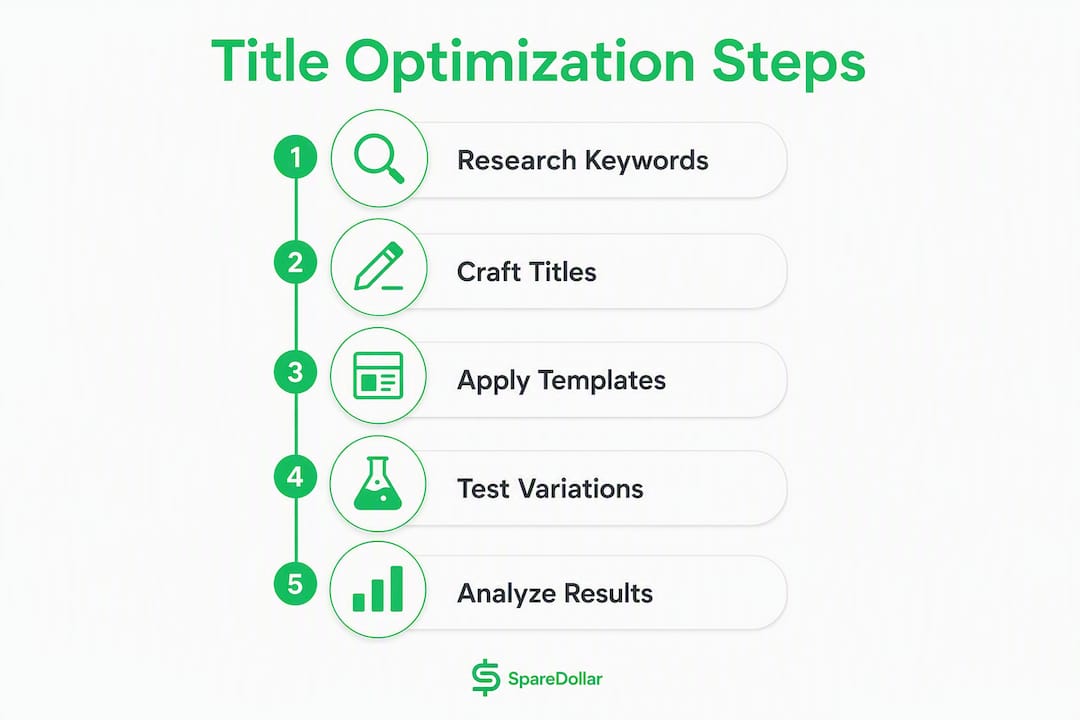
For A/B testing, change one structural element per test. Try brand-first versus model-first, or swap a secondary keyword for a size spec. One variable at a time gives you a clean signal.

How do you test title changes and when will you see results?
Testing titles on eBay doesn’t require a sophisticated setup. A simple sequential test works well for most sellers.
- Measure your baseline — Pull impressions, CTR, and conversion rate from eBay Seller Hub for the listing over the past 14–30 days. Write them down.
Metrics to watch, in priority order:
On costs: organic title testing is free. If you want faster data, a promoted listing campaign (eBay’s ad platform) can accelerate impressions significantly, though you’ll pay an ad rate on each sale. For pure title testing, organic is usually sufficient unless your listing gets very few views per week. Third-party title builder tools typically run on free tiers or modest monthly subscriptions; the free versions of most tools are enough for occasional keyword research.
Common title mistakes that kill your visibility
Most title problems fall into a short list of repeatable errors. Fix these first.
- Keyword stuffing — Packing in unrelated high-volume terms (“iPhone Nike Jordan Vintage Rare”) confuses Cassini and destroys buyer trust. Every word must describe the actual item.
- Gimmick characters — L@@K, !!!, ***, ~~ — eBay’s guidance explicitly warns against these. They reduce buyer trust and add zero keyword value.
The subtler mistake is over-optimizing for search at the expense of readability. A title that reads like a robot assembled it (“Sony Black Wireless Headphone Noise Cancel Used Good Condition Bluetooth”) might hit all the keywords but feels off to a human buyer scanning results. Titles that read naturally and hit the right keywords outperform pure keyword dumps in CTR.
Why titles get the click but your listing has to close the sale
Getting your title right earns the impression and the click. What happens after that click is a separate problem, and it’s one sellers underestimate. Listings with at least three high-quality photos show roughly an 8% increase in conversion rate, which feeds directly back into Cassini’s ranking signals. A title that drives traffic to a listing with one blurry photo is leaving money on the table and actively hurting its own ranking.
The full picture of what converts a click into a sale:
- Photos — Three or more clear, well-lit images from multiple angles. Show any flaws honestly.
- Item specifics — Fill every relevant field. Cassini uses these for filter matching; incomplete specifics mean you disappear from filtered searches.
- Description — Confirm what the title promises. Repeat the key specs in plain language.
- Price — Competitive pricing relative to sold comps. A great title at a bad price still won’t sell.
This is where SpareDollar addresses a real scaling problem. When you’re managing dozens or hundreds of listings, keeping titles, item specifics, and images consistent across all of them is genuinely hard. SpareDollar’s AI-assisted drafting generates title templates and fills item specifics automatically, so the title you wrote for one listing doesn’t contradict the specs on another. It also syncs inventory across marketplaces, which means a sold item on eBay auto-delists everywhere else, preventing the conversion-killing experience of a buyer purchasing something you no longer have.
For sellers who want to increase eBay sales beyond title tweaks, the combination of strong titles, complete item specifics, and quality photos is the baseline. SpareDollar helps maintain that baseline at scale.
Key Takeaways
Strong eBay title optimization requires front-loading 65–80 characters with brand, product type, model, and key attributes, then testing one variable at a time and aligning listing content with what the title promises.
| Point | Details |
|---|---|
| Use 65–80 characters | Titles in this range are 2.1x more likely to sell; use every character on searchable terms. |
| Front-load critical keywords | Mobile truncates at ~50–60 characters, so brand and product type must appear first. |
| Test one variable at a time | Change one title element, wait 7–21 days, then compare impressions, CTR, and conversion. |
| Match title to listing content | A title that promises “New” but shows wear in photos will hurt conversion and Cassini ranking. |
| SpareDollar for scale | SpareDollar automates title templates and item specifics so consistency holds across all listings. |
The part of title optimization most sellers skip
Here’s the thing most eBay guides won’t tell you: the title is the easiest part to fix, and sellers still obsess over it while ignoring the signals that actually determine long-term ranking.
Cassini is not a static keyword matcher. It’s a behavioral engine. A title change that improves impressions but tanks conversion will, over a few weeks, leave you worse off than before. The sellers who get durable ranking gains are the ones who treat the title as the entry point to a consistent listing, not the whole game.
The testing advice in most guides is also too vague. “Wait a few weeks and check your metrics” isn’t a plan. The specific discipline that works is isolating one structural variable per test cycle: brand-first versus model-first, size in position four versus position five, “Used Excellent” versus “Pre-Owned.” That kind of controlled iteration generates real data about what buyers in your specific niche actually click. It’s slower than rewriting every title at once, but the signal is clean.
One more thing worth saying plainly: seasonal keyword rotation is underused. Searching “vintage denim jacket” in October versus March will surface different autocomplete suggestions and different sold-listing patterns. Titles that worked in spring may underperform in fall if you haven’t updated the secondary keywords to match current search behavior. Set a calendar reminder to audit your top 20 listings at the start of each quarter. It takes 30 minutes and it’s one of the highest-ROI habits a reseller can build. (Yes, that’s the kind of advice that sounds like your dad, but your dad was right about the important stuff.)
SpareDollar makes scaling your title strategy a lot less painful
Writing one great title is satisfying. Writing 200 of them consistently, keeping item specifics accurate across every listing, and making sure a sold item on eBay doesn’t stay live on Poshmark — that’s where most sellers lose time and money.
SpareDollar handles the repetitive parts. Its AI drafts title templates based on your product details, fills item specifics automatically, and syncs inventory across marketplaces so you’re never manually delisting a sold item. Bulk editing lets you update titles across your entire catalog in one pass, which is exactly what you need after a quarterly keyword audit. It’s built specifically for eBay sellers in the US, with eBay-first workflows and per-channel pricing so your margins stay intact.
There’s a free trial, no long-term contract required. If you’re listing more than a handful of items a week, the time savings alone cover the subscription. See how SpareDollar works and start your free trial today.
Useful sources
- How to optimize your listings | eBay Export — eBay’s official guidance on listing optimization, including title best practices and item specifics. Bookmark this one.
- Create great listings | eBay Seller Centre — The source for the 80-character limit, the 2.1x sell-through data, and the photo conversion uplift figure. Primary reference for formatting rules.
- SpareDollar eBay Integration — Details on SpareDollar’s eBay-specific automation features, including title templates, bulk edits, and item-specific sync.
FAQ
What is the character limit for eBay listing titles?
eBay allows 80 characters in a listing title. Titles between 65 and 80 characters are reported 2.1x more likely to sell than shorter, less descriptive ones.
How long does it take for a title change to affect ranking?
eBay typically reindexes title changes within a few days, but meaningful behavioral data takes 7–21 days to accumulate. Lower-traffic listings need closer to three weeks before the signal is reliable.
What is the slowest month to sell on eBay?
January and February are generally the slowest months for most categories on eBay US, as post-holiday buyer demand drops sharply. Updating titles with seasonal keywords relevant to spring (gardening, outdoor gear, spring apparel) in late January can help offset the slowdown.
Why are some sellers leaving eBay?
Fee increases, policy changes, and growing competition from other marketplaces are the most commonly cited reasons. Many sellers who stay find that optimizing listings — titles, item specifics, photos — is the most direct way to maintain sales volume despite the tougher environment.
Can SpareDollar help with eBay title optimization at scale?
Yes. SpareDollar’s AI-assisted drafting generates title templates and fills item specifics automatically, and its bulk editing feature lets you update titles across your full catalog in one pass, which is the practical solution for sellers managing large inventories.