
The eight highest-impact eBay SEO tips you can apply right now:
- Front-load your title with brand, product type, model, size, and condition in the first 40–60 characters — Cassini (eBay’s search engine) and mobile screens both truncate after that point.
- Complete every item specific — required and recommended—because missing fields block your listing from filtered searches entirely.
- Shoot clean, well-lit photos on a white background with multiple angles; main image quality is the single biggest driver of clicks from search results.
- Write short, scannable descriptions (200–400 words) with bullet points first and critical details above the fold.
- Price competitively by checking recent sold listings and setting your Buy It Now price near the last sold price for comparable items.
- Offer fast handling and clear return terms — dispatch time and return policy feed directly into Cassini’s conversion probability score.
- Check your listing on a phone before publishing; eBay’s mobile guidance confirms that front-loaded titles and clear images are the two biggest mobile wins.
- Monitor Seller Hub weekly and use tools like Terapeak and SpareDollar to automate item specifics, bulk edits, and cross-listing, so you spend time on strategy, not data entry.
Key Takeaways
Optimizing eBay listings for Cassini requires hitting every signal simultaneously: keyword-rich front-loaded titles, complete item specifics, quality photos, competitive pricing, fast shipping, and clean seller metrics all compound together to lift visibility and sales.
| Point | Details |
|---|---|
| Front-load your title | Put brand, product type, model, and condition in the first 40–60 characters for Cassini and mobile display. |
| Complete item specifics | Missing structured fields block your listing from filtered searches; fill required and recommended fields every time. |
| Prioritize photo quality | A clean main image on a white background drives clicks in search; use all available photo slots for angles and detail. |
| Fix shipping and defects first | Dispatch time, tracking upload rate, and defect rate feed Cassini’s conversion score and often outrank title edits. |
| SpareDollar automates the checklist | AI-assisted drafting, bulk item specifics, inventory sync, and auto-delist reduce setup time and prevent out-of-stock defects. |
Table of Contents
- How does eBay’s Cassini search engine rank your listings?
- What’s the fastest way to research keywords and write eBay titles?
- Why do item specifics and category selection matter so much?
- What does a high-converting eBay photo setup actually look like?
- How should you write eBay descriptions that help both SEO and sales?
- How do pricing and listing format affect your eBay search rank?
- How do shipping speed and return policy affect your ranking?
- Which mobile fixes make the biggest difference for eBay listings?
- Which Seller Hub metrics should you track every week?
- What tools actually speed up eBay listing and research workflows?
- How SpareDollar helps you scale SEO-friendly eBay listings
- What actually moves the needle, based on real seller experiments
- SpareDollar cuts the time between “listed” and “sold”
- Sources
- FAQ
How does eBay’s Cassini search engine rank your listings?
Cassini, eBay’s proprietary search algorithm, has one job: surface the listing most likely to result in a completed sale. Relevance and conversion probability are its two master signals. Every ranking factor you’ll read about in this guide feeds one of those two buckets.
The main signal groups Cassini weighs:
- Title and keyword match — does your listing contain the exact phrase the buyer typed?
- Item specifics — structured fields that confirm your listing belongs in a filtered result set.
- Conversion metrics — sell-through rate, click-through rate, and watch-to-purchase ratio.
- Seller performance — defect rate, dispatch time, and tracking upload rate.
- Price and shipping — competitive price and low or free shipping increase conversion probability.
- Recency — freshly listed or recently revised listings get a short-term visibility bump.
The chain that matters most is impressions → clicks → conversions. A title that earns clicks tells Cassini the listing is relevant. A listing that converts tells Cassini it’s worth ranking higher. That feedback loop compounds over time, which is why a listing with strong early sales history tends to stay near the top even when newer competitors appear.
Statistic callout: eBay’s own mobile guidance notes that a significant share of eBay buyers shop on mobile devices — and mobile screens cut off titles early, which is why front-loading keywords isn’t just an SEO tactic; it’s a readability requirement.
Seller Hub feeds Cassini more than most sellers realize. Your defect rate, late dispatch percentage, and tracking upload speed all influence how Cassini scores your conversion probability. Operational fixes — faster packing, accurate tracking uploads — often produce larger ranking gains than tweaking a title by one word.
eBay’s platform scale means you’re competing in a marketplace with hundreds of millions of active listings. Cassini’s job is to filter that down to the 20–50 results a buyer actually sees. Getting into that set requires hitting every signal, not just one.
What’s the fastest way to research keywords and write eBay titles?
Front-loading the most important keywords in an 80-character title and cutting filler words improves both Cassini relevance and mobile display. Titles actually perform triple duty: they determine your eBay rank, affect click-through in search results, and influence how your listing appears in Google Shopping. Here’s a repeatable three-step process.
Step 1: Gather buyer-intent keywords
Type your product into eBay’s search bar and note the autocomplete suggestions — those are real buyer queries. Then filter sold listings for your product and scan the titles that closed successfully. The phrases buyers actually use to find completed sales are your highest-value keywords.
Step 2: Validate with a keyword tool
Keywords Everywhere and Keywordtool both surface search volume and related terms for marketplace queries. Use them to confirm which variant of a phrase gets more searches (“Nike Air Max 90” vs. “Air Max 90 Nike”) and to find secondary keywords worth including later in the title.
Step 3: Write and test title templates
Build your title in this order: Brand + Product Type + Model/Style + Key Attribute (size, color, material) + Condition. Keep the most critical terms in the first 40–60 characters.
Three example templates:
Nike Air Max 90 Men's Running Shoes Size 11 White NewVintage Levi's 501 Jeans Men's 32x30 Dark Wash 1990sApple iPhone 14 Pro 256GB Space Black Unlocked Excellent
Title rules of thumb:
- No filler words (“wow,” “look,” “L@@K,” “must see”).
- Spell out abbreviations when space allows (“New With Tags” beats “NWT” for buyers who don’t know the shorthand).
- Avoid ALL CAPS — it reads as shouting and wastes character space.
- Use all 80 characters; unused space is wasted ranking potential.
Pro Tip: Before publishing, paste your title into a notes app on your phone and see where it cuts off. If your most important keyword sits after character 55, move it earlier. Buyers scanning search results on a phone may never see the back half of your title.
When to update a title versus leaving it alone: if a listing has strong sales history, change only one element at a time and wait two weeks to measure the effect. Sellers in the eBay community forums consistently report that small, isolated title experiments are the cleanest way to identify what actually drives CTR without disrupting a listing’s conversion history.
Why do item specifics and category selection matter so much?
Item specifics and structured fields act as gating factors for filtered searches; a listing missing a required specific can be invisible to buyers who filter by that attribute, even if your title is perfect. eBay recommends completing both required and recommended item specifics to maximize visibility and buyer experience.
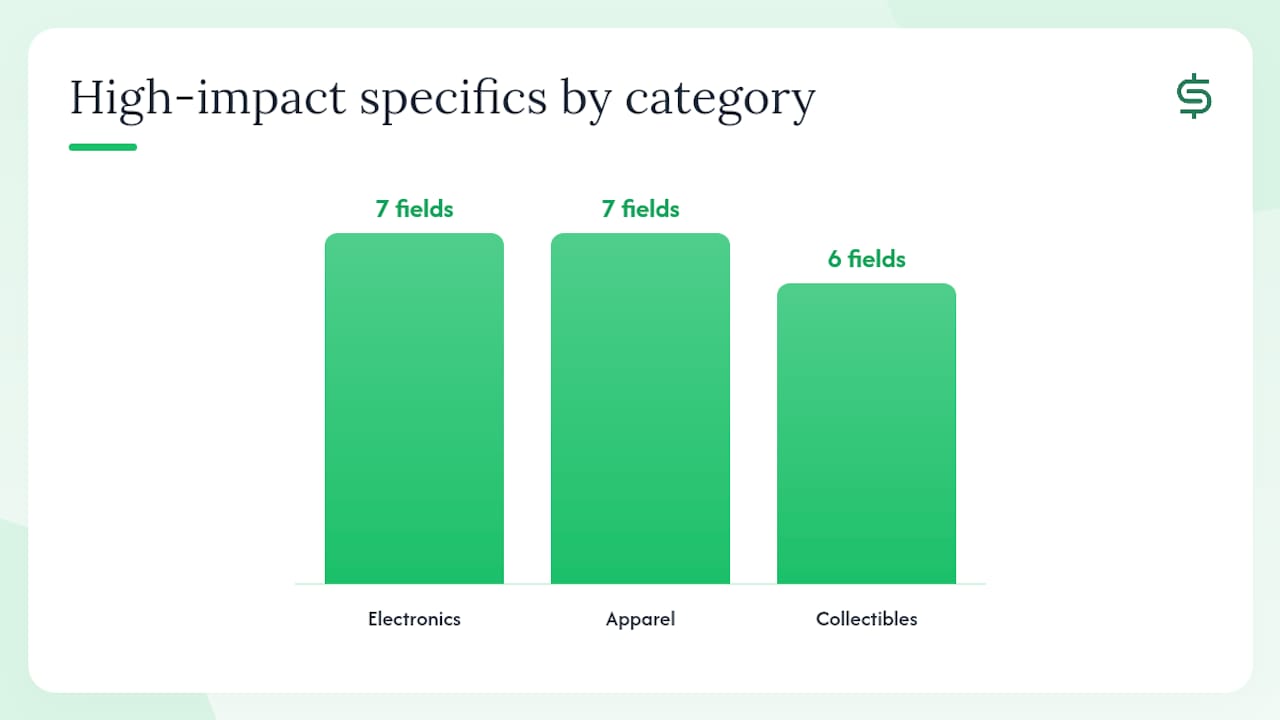
Think of item specifics as hidden keywords that live in structured data. When a buyer filters results by “Size: 11” or “Brand: Nike,” Cassini only pulls listings where those fields are populated. If yours isn’t, you don’t appear — full stop.
Highest-impact specifics by category:
- Electronics: Brand, Model, MPN (Manufacturer Part Number), Storage Capacity, Color, Condition, Compatible Model.
- Apparel: Brand, Size, Color, Material, Style, Department (Men’s/Women’s), Condition.
- Collectibles: Year, Country of Manufacture, Material, Theme, Original/Reproduction, Condition.
Identifiers — UPC, MPN, ISBN:
When a product has a UPC or ISBN, enter it. eBay’s catalog system can match your listing to a product page, which pulls in pre-filled specifics and can improve your listing’s visibility in both eBay search and Google Shopping. For items without a barcode (handmade goods, vintage items), select “Does Not Apply” rather than leaving the field blank.
Category strategy:
- Choose the most accurate category, not the one with the highest traffic. A misclassified listing confuses Cassini’s relevance scoring and frustrates buyers who find it.
- Use eBay’s category suggestions when creating a listing — they’re based on your title keywords and are usually correct.
- If your item fits two categories, check which one has more active sold listings for your product type. That’s where buyers are already looking.
- Review your category choice when you relist slow-moving items — a wrong category is one of the most overlooked reasons a listing underperforms.
What does a high-converting eBay photo setup actually look like?
eBay’s official photo guidance is clear: high-quality main images and multiple photos increase clicks and buyer trust. The main image is what buyers see in search results before they ever read your title, so it’s doing the heaviest lifting in your CTR.
Photo checklist:
- Main image: clean white or neutral background, product centered and filling 80%+ of the frame, no text overlays, no watermarks, no borders.
- Number of images: use all available slots (eBay allows up to 24 photos). More angles reduce buyer hesitation.
- Angles to include: front, back, sides, close-up of any wear or defects, size reference (ruler or common object), label or serial number if relevant.
- Resolution: minimum 500×500 pixels; 1600×1600 or higher is better for zoom functionality.
- What to avoid: stock photos for used items, heavy props that distract, blurry or dark shots, screenshots of other listings.
Pro Tip: A $30 lightbox from Amazon and a white foam board produce results that rival a professional setup for most small items. Shoot in batches — photograph 20 items in one session, edit in bulk using free tools like Snapseed or the desktop version of Lightroom. Consistent lighting across your listings also builds brand recognition in search results.
Image quality feeds Cassini indirectly. Better photos drive higher CTR and lower return rates (because buyers know exactly what they’re getting), both of which improve your conversion signals. A listing with six sharp photos consistently outperforms an identical listing with one mediocre shot.

How should you write eBay descriptions that help both SEO and sales?
Keep descriptions short (200–400 words), scannable, and buyer-focused — use natural secondary keywords rather than stuffing. Heavy HTML, flashing banners, and active content slow mobile load times and can actually suppress your listing in search.
What to include in every description:
- Condition details (any wear, scratches, missing parts — be specific).
- What’s included in the box or shipment.
- Key measurements or specifications not captured in item specifics.
- A one-line shipping and return summary.
- A natural mention of secondary keywords (model number, compatible products, material).
Mobile formatting rules:
Put your most critical information in the first two to three bullet points. Buyers on phones rarely scroll past the fold. Use plain bullet points rather than complex HTML tables, and keep paragraphs to two to three sentences maximum.
A compact example structure:
Over time, use buyer questions to improve your descriptions. If three buyers ask the same question about compatibility or sizing, add that answer to the description. It reduces pre-sale friction and signals to Cassini that your listing is thorough and trustworthy.
How do pricing and listing format affect your eBay search rank?
Cassini rewards listings likely to convert, and price is one of the clearest conversion signals it has.
Pricing heuristics that work:
- Check the last 10–15 sold listings for your exact item and set your Buy It Now price within 5–10% of the median sold price.
- For common consumer goods, free shipping with the cost built into the item price often outperforms a lower item price with a shipping fee — buyers filter by “free shipping” frequently.
- Small markdowns (5–10%) through eBay’s Markdown Manager can trigger a “Sale” badge on your listing, which improves CTR without requiring a major price cut.
- Use eBay’s pricing guidance to stay within platform rules on pricing practices.
Auction vs. fixed-price:
Auctions work best for collectibles, rare items, or anything with uncertain demand — the bidding process surfaces the true market price and creates urgency. Fixed-price (Buy It Now) is better for common consumer goods, replenishable inventory, and anything you sell regularly. A fixed-price listing with strong sales history also compounds its ranking over time in a way an auction listing resets after each sale.
Promoted Listings:
eBay’s Promoted Listings Standard charges a fee only when a buyer clicks your ad and purchases within 30 days. It’s worth testing on listings with good conversion rates but low impressions — you’re amplifying a listing that already works, not rescuing one that doesn’t. For pricing tools and repricing strategies that help you stay competitive automatically, a dedicated repricing workflow saves significant time at scale.
How do shipping speed and return policy affect your ranking?
Faster handling and clear shipping terms increase conversion probability, and Cassini scores that directly. A listing with same-day or one-day handling time will outrank an otherwise identical listing with a three-day handling window, because Cassini predicts the faster seller is more likely to complete the transaction without issues.
Shipping action checklist:
- Set handling time to one business day if your workflow allows it — two days maximum to stay competitive.
- Upload tracking within your stated handling window every time; late tracking uploads count against your seller metrics.
- Offer free shipping when your margin supports it; buyers filter by free shipping and it removes a friction point at checkout.
- State your return policy clearly in the listing — “30-day returns accepted” outperforms vague or no-return policies for both buyer confidence and Cassini scoring.
eBay Guaranteed Delivery:
This program lets buyers filter for items that arrive by a specific date. To qualify, you need to meet eBay’s handling time and carrier requirements. It’s worth offering if you ship daily and use a tracked service — the “Guaranteed Delivery” badge in search results is a visible trust signal that improves CTR.
Reducing defects is the operational fix with the highest SEO leverage. A single “item not as described” case or late shipment can suppress your listing’s visibility for weeks. Accurate descriptions, fast dispatch, and prompt communication prevent most defects before they happen.
Which mobile fixes make the biggest difference for eBay listings?
eBay’s mobile guidance recommends front-loaded titles, clear images, and scannable descriptions as the three highest-impact changes for mobile shoppers. Given that a large share of eBay buyers browse and buy on phones, optimizing for mobile isn’t optional.
Mobile-specific checklist:
- Title truncation test: view your listing on a phone in search results. If your key product attribute is cut off, move it earlier in the title.
- Main image preview: your main photo should be recognizable at thumbnail size (roughly 200×200 pixels on a phone screen). A cluttered background or small product makes it invisible.
- First-line description: the first sentence or bullet point should state the most important fact — condition, key spec, or what’s included. Buyers on phones rarely scroll.
- Shipping and return labels: make sure your handling time and return policy are visible without scrolling; these are decision factors for mobile buyers.
The practical implication for title writing: if you’re choosing between two equally relevant keywords, put the one that’s more visually distinctive earlier. “Red” before “Vintage” if color is the primary search driver. “256GB” before “Unlocked” if storage is what buyers filter by. Mobile behavior makes the first five words of your title the most valuable real estate in your listing.
Which Seller Hub metrics should you track every week?
Monitor defect rate, dispatch time, tracking upload rate, and sell-through rate — these feed directly into Cassini’s scoring of your listings. eBay Seller Hub is the canonical place to track all of them.
Seller Hub metrics checklist:
To spot low-impression listings, go to Seller Hub → Performance → Listings. Sort by impressions ascending. Listings with near-zero impressions over 30 days are either miscategorized, missing item specifics, or priced far outside the market. The fastest fix is usually a title rewrite plus completing any blank item specifics — then wait two weeks before judging the result.
For inventory management, preventing out-of-stock situations is as important as any SEO tactic. A listing that sells but can’t ship creates a defect. Managing eBay inventory with automatic sync across channels prevents the out-of-stock defects that quietly suppress your seller metrics over time.
What tools actually speed up eBay listing and research workflows?
Use eBay-native features first — Seller Hub, Terapeak, Promoted Listings, and Markdown Manager — then add a small set of third-party tools for keyword research and bulk edits. The goal is to automate structured data and repetitive tasks while keeping final title and description approval manual for high-value items.
Tool categories and use cases:
- Keyword research: Keywords Everywhere for search volume overlays while browsing eBay; KeywordTool.io for long-tail query suggestions specific to marketplace searches.
- Pricing and market research: Terapeak (built into Seller Hub) for sold-listing data, price trends, and demand analysis by category.
- Bulk listing and item specifics: SpareDollar for AI-assisted title and description drafting, automated item specifics population, and bulk listing across multiple marketplaces from a single entry point.
- Image editing: Snapseed (mobile), Adobe Lightroom (desktop), or Remove.bg for background removal on product photos.
- Analytics: Seller Hub’s built-in performance reports for impressions, CTR, and sell-through by listing.
- SEO support: if you want broader e-commerce SEO support beyond eBay’s native tools, SEO packages from a specialist can complement your listing strategy with off-platform visibility.
Automation boundaries:
Automate item specifics population, bulk price updates, inventory sync, and cross-listing to secondary marketplaces. Keep manual control over final title wording and description tone for high-value or unique items — AI drafts are a starting point, not a finished product. For bulk listing workflows, the time savings compound quickly once you’re processing more than 50 listings at a time.
How SpareDollar helps you scale SEO-friendly eBay listings
SpareDollar automates the most time-consuming parts of listing optimization: populating item specifics, drafting titles and descriptions with AI assistance, syncing inventory across marketplaces, and applying per-channel pricing. For sellers managing hundreds of SKUs, that’s the difference between spending a weekend on data entry and spending an hour reviewing AI drafts.
Core SpareDollar features tied to the tactics in this guide:
- AI title and description drafting — generates keyword-rich drafts you approve before anything goes live; reduces blank-field errors and filler words.
- Automated item specifics — pulls structured data from barcodes and catalog matches, filling the fields that gate filtered search visibility.
- Barcode scanning — scan a product and SpareDollar pre-fills identifiers (UPC, MPN) and catalog-matched specifics instantly.
- Inventory sync and auto-delist — when an item sells on one channel, it delists automatically on others, preventing the out-of-stock defects that hurt Cassini scoring.
- Per-channel pricing — set different prices for eBay, Poshmark, Depop, Mercari, and Shopify without managing separate spreadsheets.
- Sales and profit analytics — track sell-through rate and margin by listing, the same metrics Seller Hub surfaces but across all your channels in one view.
- Free imports — pull existing listings from eBay, Poshmark, Depop, Mercari, or Shopify into SpareDollar without re-entering data.
A typical seller scenario: a reseller with 500 active eBay listings spends hours each week updating item specifics manually after eBay adds new required fields. With SpareDollar’s bulk actions and AI-assisted specifics, that same update takes a fraction of the time — and the accuracy improvement reduces the listing defects that quietly suppress search visibility. (Think of it as the difference between hand-addressing 500 envelopes and hitting “print labels.” Same destination, much less hand cramp.)
For a full look at SpareDollar’s eBay-specific features, the marketplace page walks through exactly how the integration works.
What actually moves the needle, based on real seller experiments
The fastest gains I’ve seen in seller experiments don’t come from the tactics most guides lead with. Minor price cuts rarely move a listing’s rank. What actually works: front-loaded titles combined with fast handling time. Those two changes together improve both Cassini’s relevance score and its conversion probability estimate simultaneously, which compounds faster than either change alone.
The second lesson that surprises sellers: mobile-first images lift CTR more than most expect. A listing with a clean, well-lit main photo that reads clearly at thumbnail size will outperform a listing with a technically superior but visually cluttered photo at full size. Buyers make the click decision in under a second on a phone screen.
The third lesson is about patience. Cassini takes time to re-score a listing after changes. Sellers who update a title and check rankings the next day are measuring noise, not signal. Two weeks is the minimum window for a meaningful read on whether a change worked.
One more thing: the sellers who improve fastest aren’t the ones who know the most eBay SEO tips. They’re the ones who test one variable at a time, track the result in Seller Hub, and iterate. It’s less glamorous than a 47-point checklist, but it’s what actually compounds. (And yes, SpareDollar helps with the tracking part — because even the best experiments are useless if you can’t remember what you changed.)
SpareDollar cuts the time between “listed” and “sold”
Applying every tactic in this guide manually across hundreds of listings is where most sellers stall. SpareDollar gives you AI-drafted titles and descriptions, automated item specifics, inventory sync that prevents out-of-stock defects, and cross-listing to multiple marketplaces from a single listing entry. You stay in control — every draft goes through your approval before it goes live — but the grunt work is handled.
Start with a free trial and see how many listings you can optimize in the time it used to take to do one. Try SpareDollar for eBay sellers and list once, sell everywhere.
Sources
- eBay Title Optimization: 80 Characters That Actually Sell
- How to make your listings more mobile friendly
FAQ
What are the most important eBay SEO tips for new sellers?
Focus on three things first: write a keyword-rich title with the most important terms in the first 40–60 characters, complete every item specific (required and recommended), and use a clean main photo on a white background. These three changes address the biggest ranking signals Cassini uses and produce the fastest visible results.
How do I get more views on my eBay listings?
Front-load your title with buyer-intent keywords, complete all item specifics so your listing appears in filtered searches, and check your sell-through rate in Seller Hub to identify which listings need a title or photo update. Listings with low impressions over 30 days usually have a missing specific or a title that doesn’t match how buyers search.
Does pricing affect how eBay ranks my listing?
Yes. Cassini factors in conversion probability, and price is one of its clearest signals. A listing priced significantly above comparable sold items converts less often, which lowers its rank over time.
What is the 3-day rule on eBay?
eBay’s seller performance standards measure late shipment based on your stated handling time. Exceeding your handling time repeatedly can suppress your listing visibility.
How do I make more sales on eBay each month?
The sellers who grow consistently combine strong listing fundamentals (optimized titles, complete item specifics, quality photos) with operational discipline (fast dispatch, accurate tracking, low defect rate) and regular Seller Hub reviews to catch underperforming listings early. Tools like SpareDollar that automate item specifics and inventory sync free up time to focus on sourcing and pricing strategy rather than data entry.