
Yes, you can sync eBay with Shopify right now. Install a connector app from the Shopify App Store, authorize your eBay seller account, map your product attributes, and enable inventory and order sync. That’s the whole loop. According to Shopify’s official eBay integration guide, connecting the two platforms gives you real-time inventory sync, consolidated order management, and bulk listing imports from a single dashboard.
Here’s your 2-minute action starter:
- Install Shopify Marketplace Connect (free, official) or SpareDollar from the Shopify App Store
- Authorize your eBay seller account and grant listing and order permissions
- Map SKUs, barcodes, categories, conditions, and item specifics
- Enable inventory sync with Shopify as the single source of truth
- Run a test batch of a small number of SKUs before going full catalog
Pro Tip: Before you touch the sync settings, audit your Shopify catalog first. Missing UPCs and blank item specifics are the top reasons eBay rejects listings on the first push.
Table of Contents
- How do you sync eBay with Shopify in 4 steps?
- Which product fields must you map to avoid listing errors?
- What causes sync failures and how do you fix them?
- What’s the right rollout plan and what will it cost?
- How does SpareDollar handle the eBay and Shopify connection?
- Key Takeaways
- The part most guides skip
- SpareDollar makes your first sync the easy one
- Useful sources to bookmark
- FAQ
How do you sync eBay with Shopify in 4 steps?
Getting the eBay Shopify integration live takes four ordered steps. Skip one and you’ll spend twice as long troubleshooting.
-
Install a connector app. Go to the Shopify App Store and install your chosen integration tool. Shopify Marketplace Connect is the official free option. SpareDollar is the recommended option if you want AI-assisted item specifics, per-channel pricing, and bulk import from eBay built in from day one.
-
Authorize your eBay seller account. Inside the app, connect your eBay account using your seller credentials. Grant permissions to manage listings, read and write orders, and handle inventory. Without full permissions, sync will fail silently on orders or inventory updates.
-
Map attributes and create listing templates. This is where most sellers lose time. Map every critical field before you push a single listing: SKU to Item ID, barcode to UPC, Shopify title to eBay title, variant options to eBay variations, and your price field to Buy It Now price. Create category templates with default condition IDs and item specifics so eBay doesn’t reject listings for missing required fields. Check marketplace listing compliance requirements before bulk-pushing to catch gaps early.
-
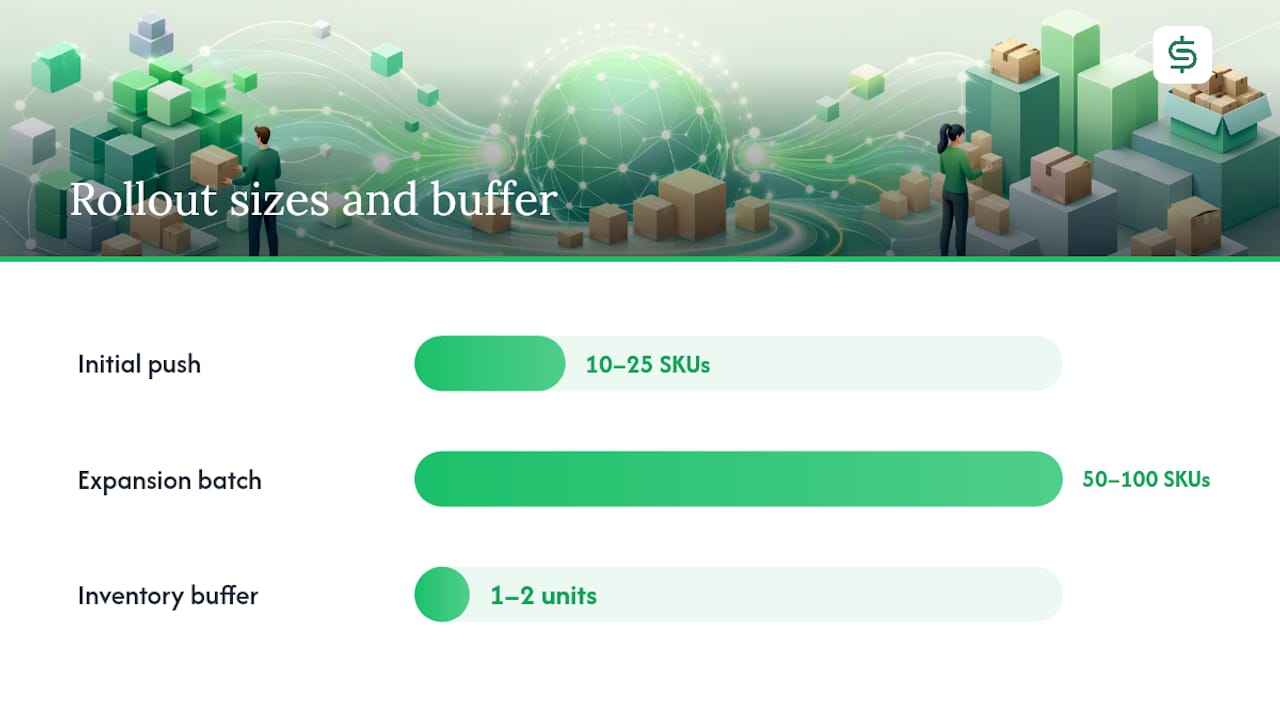
Enable sync and run a test batch. Turn on inventory and order synchronization, designate Shopify as the single source of truth, and configure multi-location mapping if you hold stock in more than one warehouse. Then push 10–25 SKUs first. Confirm inventory counts match on both sides, place a test order, and verify it appears in Shopify before expanding.
Pro Tip: Set up listing templates by eBay category before bulk-syncing. A template that pre-fills condition, item specifics, and return policy will save you from individually fixing hundreds of rejected listings.
Which product fields must you map to avoid listing errors?
Attribute mapping is where the eBay Shopify sync either holds together or falls apart. eBay requires specific fields that Shopify doesn’t enforce, so the connector has to bridge that gap.
Critical fields to map:
- SKU: — Your single identifier across both platforms. Every Shopify variant needs a unique SKU before you attempt the push.
| Shopify Field | eBay Field |
|---|---|
| SKU | Item ID / Seller SKU |
| Barcode | UPC |
| Title | Listing title |
| Variant options | eBay variations |
| Price | Buy It Now price |
| Inventory quantity | Available stock |
Image sync deserves its own note. By default, Shopify pushes its product images to eBay. If you manage eBay images separately (different backgrounds, extra detail shots), turn this off. Per Shopify’s Marketplace Connect documentation, the steps are: Apps > Marketplace Connect > Listings > Bulk edit > Columns > Catalog image sync > Off.
For multi-location sellers, configure the connector to pull inventory from the correct location. Pulling from the wrong warehouse is a quiet oversell waiting to happen.
Pro Tip: Add all required item specifics directly in Shopify using metafields or custom attributes before the first sync. Fixing them post-push requires relisting, not just editing.
What causes sync failures and how do you fix them?
Most eBay Shopify sync problems fall into a short list of categories. Here’s what to look for and how to fix each one.
Common problems:
- SKU mismatch: A Shopify variant has no SKU, or the SKU changed after the initial link. The connector loses the association.
- Missing UPCs: eBay rejects listings in most US categories without a valid UPC or an exemption.
- Attribute/condition errors: Required item specifics are blank or the condition ID doesn’t match the eBay category’s allowed values.
- Duplicate listings: Happens when you push a product that already exists on eBay as a manual listing. The connector creates a second one instead of linking to the existing one.
- Image sync mismatch: eBay shows Shopify images when you wanted custom ones, or images fail to push because of file size or format.
- Delayed updates: Inventory changes in Shopify take longer than expected to reflect on eBay, leading to oversells during high-traffic periods.
Step-by-step fixes:
- Open the connector’s error log. Every major integration app surfaces listing errors with an error code and a reason. Start there, not with eBay’s seller hub.
- Test with a single product. Isolate one failing SKU, fix the attribute, and push it manually to confirm the fix before applying it in bulk.
- Use Shopify’s bulk editor to correct attributes across multiple products at once. This is faster than editing product by product.
- To fix duplicate listings, unlink the connector’s version, manually end the duplicate on eBay, then relink the correct listing to the Shopify product.
- For order sync failures, check that your eBay API permissions include order read/write access. A missing webhook permission is the most common cause. Shopify’s developer documentation covers webhook configuration for advanced setups.
Returns and refunds need their own workflow. When a buyer returns an item on eBay, the refund should trigger a corresponding update in Shopify. Confirm your connector maps eBay return requests to Shopify refunds, and test this flow before going live. Real-world troubleshooting examples from eBay community threads show that missed refund webhooks are a frequent pain point sellers discover only after a customer complaint.
If a bulk sync goes badly, roll back by disabling the sync, manually correcting inventory counts in Shopify, and ending any incorrectly created eBay listings before re-enabling. Capture screenshots of error codes and logs before contacting support.
What’s the right rollout plan and what will it cost?
A phased rollout is the difference between a clean launch and a week of cleanup. The Webgility integration guide and industry practitioners consistently recommend the same sequence: test small, validate, then expand.
Rollout sequence:
- Push 10–25 SKUs first, covering different categories and condition types
- Verify inventory counts match on both platforms after 24 hours
- Place a test order on eBay and confirm it appears in Shopify
- Process a test refund and confirm it reconciles in Shopify
- Check multi-location stock if applicable
- Expand by batch: 50–100 SKUs at a time, with a 24-hour validation window between batches
Single source of truth: Designate Shopify as canonical for inventory. Set the connector to push inventory changes from Shopify to eBay, not the other way around, unless you have a specific reason to bi-sync. Two-way sync without clear rules creates conflicts when both platforms update the same SKU simultaneously.
For multi-channel inventory management, set inventory thresholds in the connector. A buffer of 1–2 units prevents oversells during flash sales or promotions when sync delays are most likely.
Timeline and cost expectations: A small catalog typically takes a few hours to configure and test. A large catalog with complex variations or multiple locations can take several days, including data enrichment time for missing UPCs and item specifics. Connector apps range from free (Shopify Marketplace Connect) to paid monthly subscriptions depending on listing volume and features. Budget additional time for catalog cleanup if your Shopify data has gaps.
Pro Tip: Schedule sync windows during off-peak hours if your connector supports it. Running a large inventory update during a flash sale is how oversells happen.
How does SpareDollar handle the eBay and Shopify connection?
SpareDollar is built specifically for eBay sellers who list across multiple marketplaces, and its feature set maps directly to the checklist above.
What SpareDollar covers:
- Single-listing distribution across eBay, Shopify, and other marketplaces from one place
- AI-assisted drafting that prefills item specifics and reduces attribute errors before a listing goes live
- Free bulk imports from eBay, Poshmark, Depop, Mercari, and Shopify to speed migrations
- Per-channel pricing so your eBay price can differ from your Shopify price without manual edits
- Barcode scanning to match products and fill UPC fields automatically
- Inventory sync with auto-delist when a product sells, preventing oversells across channels
- Sales and profit analytics to track performance per channel
SpareDollar implements the single source of truth model by treating your listing as the master record and pushing updates to each connected marketplace. Multi-location mapping is handled at the connector level, so stock from different warehouses stays accurate without manual reconciliation.
On security: when you authorize SpareDollar, it requests only the permissions needed to manage listings and sync orders. You retain full control and can revoke access at any time from your eBay or Shopify account settings.
| Feature | Manual / Marketplace Connect | SpareDollar |
|---|---|---|
| AI item specifics drafting | No | Yes |
| Per-channel pricing | Limited | Yes |
| Bulk import from eBay | No | Yes (free) |
| Barcode scanning | No | Yes |
| Auto-delist on sale | No | Yes |
| Sales analytics | No | Yes |
Sellers using SpareDollar report fewer listing errors at the point of creation because the AI prefills required fields before the push, rather than letting eBay reject the listing after the fact. That shift from reactive fixing to proactive drafting is where the time savings actually show up. See the SpareDollar Shopify marketplace page for a full feature walkthrough.
Pro Tip: Use SpareDollar’s free eBay import to pull your existing eBay listings into the system first. It’s faster than rebuilding from Shopify, and you keep all your original item specifics intact.
Key Takeaways
Connecting eBay and Shopify requires four steps: install a connector, authorize eBay, map attributes with templates, and test a small batch before scaling.
| Point | Details |
|---|---|
| Install and authorize first | Choose Shopify Marketplace Connect or SpareDollar, then grant full listing and order permissions. |
| Map templates before bulk sync | Create category templates with condition IDs and item specifics to prevent eBay rejections at scale. |
| Test 10–25 SKUs first | Validate inventory counts, orders, and refunds on a small batch before expanding to the full catalog. |
| Shopify is the source of truth | Set Shopify as canonical for inventory to avoid two-way sync conflicts and oversells. |
| SpareDollar for faster rollout | AI drafting, barcode scanning, and free eBay imports reduce setup time and listing errors from day one. |
The part most guides skip
Most eBay Shopify integration articles spend their energy on the install steps and almost none on what happens after. The install is 20 minutes. The real work is catalog hygiene: missing UPCs, blank item specifics, inconsistent condition IDs. Those gaps don’t show up until eBay rejects your listings, and by then you’ve already wasted a sync attempt on a dirty catalog.
The other thing sellers underestimate is the single source of truth decision. It sounds like a technical setting, but it’s actually a business decision. If you let eBay and Shopify both write inventory counts back to each other, you will eventually get a conflict, and the platform that “wins” will be whichever one updated last, not whichever one is correct. Pick Shopify, lock it in, and don’t second-guess it.
Per-channel pricing is the third overlooked piece. eBay fees, shipping expectations, and buyer behavior differ from Shopify’s direct channel. A flat price across both platforms means you’re either leaving margin on the table on Shopify or pricing yourself out on eBay. Tools that support per-channel pricing rules, like SpareDollar, make this a one-time configuration rather than a manual adjustment every time you reprice.
If your catalog is clean and your templates are set, the sync itself is almost boring. Which, honestly, is exactly what you want. (Why did the eBay seller bring a ladder to the sync setup? Because they heard the listings were going through the roof.)
SpareDollar makes your first sync the easy one
Sellers who want an out-of-the-box path to connect eBay to Shopify without building templates from scratch get the most from SpareDollar’s free trial. The trial includes bulk import from eBay, AI-assisted item specifics drafting, and inventory sync across channels. You can pull your existing eBay listings in, map them to Shopify products, and have a working sync running before you’d finish configuring a manual setup.

After signup, onboarding walks you through the connection sequence, and support is available for catalogs with complex variations or unusual category requirements. Start at SpareDollar’s marketplaces page or go directly to the Shopify integration preview to see exactly what connects and how.
Useful sources to bookmark
These are the authoritative references for setup, troubleshooting, and advanced configuration. All are US-focused or apply directly to US sellers.
- Shopify eBay Integration: How To Connect Your Store (2026) - Shopify
- Shopify Help Center | Setting up and managing eBay listings
- Shopify eBay Integration Guide (With Challenges and Best Practices)
- Linking Shopify to eBay using Shopify Marketplace Connection - eBay Community
- shopify.dev
| Resource | Best for |
|---|---|
| Shopify eBay integration blog | First-time setup and feature overview |
| Shopify Help Center (Marketplace Connect) | Image sync, bulk editor, listing defaults |
| shopify.dev | Webhooks and advanced API configuration |
| eBay Community thread | Peer troubleshooting and real error examples |
| Webgility integration guide | Best practices, timelines, and cost planning |
FAQ
Can you sync eBay with Shopify for free?
Yes. Shopify Marketplace Connect is a free official connector available in the Shopify App Store that handles inventory and order sync between eBay and Shopify.
How long does the eBay Shopify integration take to set up?
A small catalog typically takes a few hours to configure and test. Larger catalogs with complex variations or missing product data can take several days.
What happens to inventory when a product sells on eBay?
With sync enabled and Shopify set as the single source of truth, a sale on eBay triggers an inventory update in Shopify, which then pushes the corrected count back to all connected channels.
How do you stop Shopify from overwriting your eBay images?
In Shopify Marketplace Connect, go to Apps > Marketplace Connect > Listings > Bulk edit > Columns > Catalog image sync, then set it to Off for the listings where you manage images directly on eBay.
Does SpareDollar support per-channel pricing for eBay and Shopify?
Yes. SpareDollar supports per-channel pricing rules, so your eBay price can differ from your Shopify price without manual edits each time you reprice.