
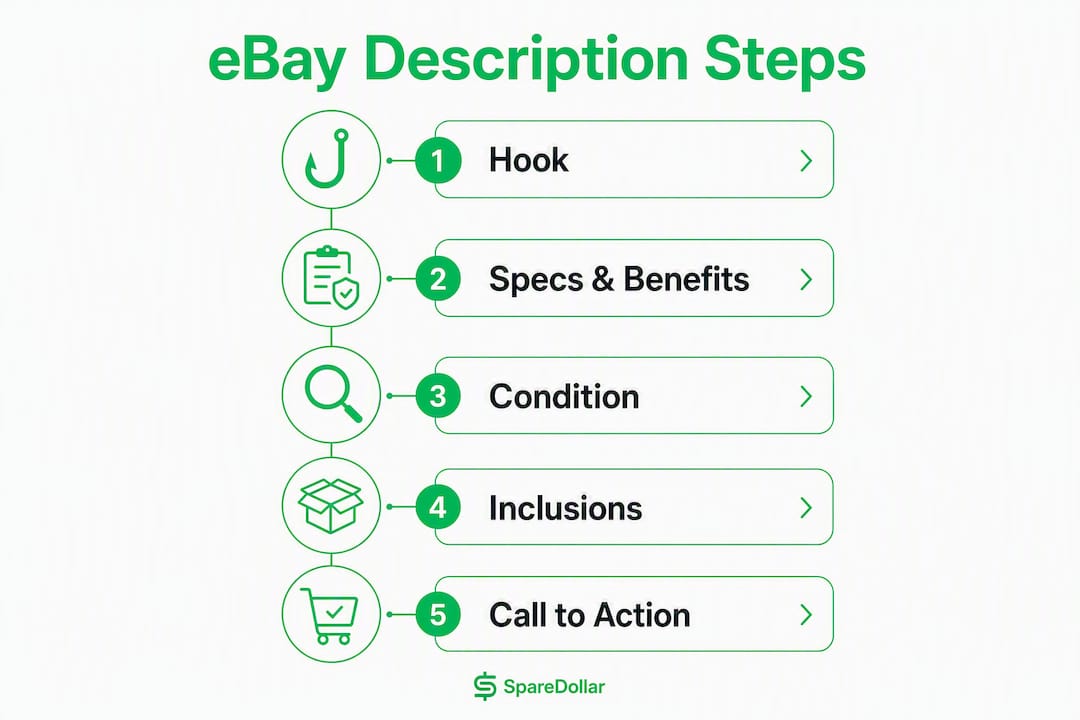
A great eBay description answers buyer doubts in the first eight seconds: condition, key feature, and what’s in the box. Fill your Item Specifics before you write a single word, build an 80-character title front-loaded with brand and model, then write a description that opens with a hook, lists specs and benefits, states condition honestly, and closes with a clear call to action. That’s the whole game.
- Fill Item Specifics first (filters exclude listings that skip them)
- Write an 80-character title: Brand + Model + Key Attribute + Condition
- Open the description with a 200–250 character hook covering item identity, condition, and the one detail that closes the sale
- List specs as bullets, convert each to a buyer benefit
- State every flaw plainly and reference the photo that shows it
- End with shipping/returns and a brief CTA
Pro Tip: Before you hit List, pull up the listing on your phone. Mobile users see only the first 200–250 characters before a “Read more” link — if your hook isn’t there, most buyers won’t tap through.
Tools like SpareDollar and eBay’s own AI description feature can draft that opening for you. The catch: you still have to verify every word against the physical item. More on that workflow below.

Table of Contents
- What should every eBay description include?
- Why should you fill Item Specifics before writing the description?
- How do you format descriptions for mobile buyers?
- What eBay policies must your description follow?
- How do you optimize eBay listings for search?
- Ready-to-use eBay description templates by category
- What mistakes kill eBay sales, and how do you fix them fast?
- How do you use AI tools safely to write eBay descriptions?
- What’s the fastest path from zero to a published listing?
- Key Takeaways
- The part most sellers skip (and why it costs them)
- SpareDollar cuts listing time without cutting corners
- Useful sources
- FAQ
What should every eBay description include?
The goal is zero unanswered buyer questions. Every message asking “Does it come with the charger?” is a sale you almost lost. Cover these facts and you cut those messages sharply.
Mandatory facts:
- Brand and model number (exact, not approximate — “Sony WH-1000XM4,” not “Sony noise-canceling headphones”)
- Exact measurements or dimensions (inches for U.S. buyers; weight if shipping cost matters)
- Condition summary and specific flaws (scratches, cracks, missing parts, signs of repair)
- Serial or model numbers for electronics and high-value items
- What’s included (original box, manuals, cables, accessories, cases)
High-value optional details:
- Provenance (where you bought it, how long you owned it)
- Storage conditions (kept in smoke-free home, original packaging)
- Recent servicing or battery replacement
- Authenticity markers (original receipt, certificate of authenticity, hologram sticker)
Where each fact lives matters as much as the fact itself. The brand, model, and condition go in the first sentence. Measurements and inclusions go in bullets. Serial numbers belong in both the Item Specifics field and the description body. Provenance and storage conditions can sit in a short paragraph after the bullets.
Here’s what honest condition language looks like for a used electronics item:
That’s specific, honest, and complete. A buyer reading it knows exactly what they’re getting.

Pro Tip: Reference photo numbers when disclosing flaws. “Scratch visible in photo #3” does two things: it proves you’re not hiding anything, and it reduces buyer messages and return claims by setting accurate expectations before purchase.
Why should you fill Item Specifics before writing the description?
Item Specifics are the structured fields eBay’s search engine, Cassini, uses to match listings to filtered searches. A buyer who filters by “Brand: Sony” or “Condition: Used” never sees your listing if those fields are blank, no matter how good your description is. Fill them first, every time.
eBay’s Cassini algorithm prioritizes titles and structured fields over description text for search ranking. The description matters for conversion once a buyer lands on your listing, but it does almost nothing for discovery.
Title formula that captures search intent
Brand + Model + Key Attribute(s) + Size/Color + Condition
Examples across categories:
- Electronics:
Sony WH-1000XM4 Wireless Noise-Canceling Headphones Black Used - Apparel:
Levi's 501 Original Fit Jeans Men's 32x32 Dark Wash New With Tags - Collectibles:
1989 Topps Ken Griffey Jr. Rookie Card #1 PSA 8 NM-MT
Title do’s and don’ts:
| Do | Don’t |
|---|---|
| Front-load brand and model | Open with filler words (“Great deal!”) |
| Use the buyer’s exact search language | Use ALL CAPS for emphasis |
| Include size, color, or key spec | Repeat the same word twice |
| State condition when space allows | Add punctuation like !!!, ***, or — |
| Use all 80 characters | Pad with vague adjectives (“amazing,” “rare”) |
Where each fact belongs:
| Fact | Title | Item Specifics | Description |
|---|---|---|---|
| Brand | ✓ Primary | ✓ Required field | Optional (first sentence) |
| Model number | ✓ Primary | ✓ Required field | ✓ First sentence |
| Condition | ✓ If space | ✓ Required field | ✓ First sentence |
| Measurements | ✗ | ✓ Where available | ✓ Bullet list |
| Flaws | ✗ | ✓ Condition notes | ✓ With photo ref |
| Inclusions | ✗ | ✓ Where applicable | ✓ Bullet list |
| Serial number | ✗ | ✓ If field exists | ✓ Body text |
Pro Tip: Paste the same condition language into the Condition field, the title (when space allows), and the first line of the description. Conflicting condition statements across fields are one of the fastest ways to trigger an item-not-as-described claim.
How do you format descriptions for mobile buyers?
More than half of eBay browsing happens on phones. A description that looks clean on desktop can turn into an unreadable wall of text on a 6-inch screen. Format for the phone first; desktop will take care of itself.
Mobile-first rules:
- Lead with the hook in the first 200–250 characters: item identity, condition, and the one feature that closes the sale
- Keep paragraphs to one or two sentences
- Use bullets for specs, dimensions, and inclusions
- Bold a key spec sparingly (battery life, screen size, material) — not every other word
- Reference photos by number: “See photo #3 for stitching close-up”
Formatting do’s:
- Single-column layout only
- Short, plain-language headers if the description is long (e.g., What’s Included, Condition Details)
- Simple HTML tags if you use any (
<b>,<ul>,<li>) — eBay renders these reliably - Bullets for dimensions and inclusions
Formatting don’ts:
- Multi-column HTML tables (they collapse badly on mobile)
- External embedded images (eBay strips many of these)
- ALL CAPS for pitch language (“LOOK!!!”, “MUST SEE!!!”)
- JavaScript or Flash (eBay prohibits active content outright)
- Fonts smaller than the default or decorative typefaces that reduce readability
Photo callout example: instead of “there are some scratches,” write “Light scratches on the back panel — see photo #4 for exact location and size.” That one sentence does more for buyer trust than three paragraphs of reassurance.
Pro Tip: Use eBay’s built-in mobile preview before publishing. It shows exactly what a phone buyer sees, including where the “Read more” truncation falls. If your hook is cut off, shorten the first sentence.
What eBay policies must your description follow?
eBay’s seller policies require that every description accurately represents the item. That sounds obvious, but the specific rules catch sellers off guard more often than you’d expect.
Rules to follow:
- State condition honestly and specifically (not just “good condition” — describe what “good” means for that item)
- Disclose all modifications, repairs, or replaced parts
- Never claim an item is authentic unless you can verify it (fake authenticity claims violate eBay’s VeRO program and can result in permanent suspension)
- No active content: JavaScript, Flash, and externally hosted scripts are prohibited
- No false “brand new” or “sealed” claims for opened or used items
Forbidden claims to avoid:
- “Brand new in box” for an item that has been opened
- “Mint condition” without specifying what that means
- “Guaranteed authentic” without documentation
- Manufacturer copy pasted verbatim (copyright issues and inaccuracy risk)
- Claims about items you haven’t physically verified
Accuracy is also a practical SEO issue. Vague condition language (“works great!”) tells Cassini nothing and tells buyers even less. Specific language (“tested, fully functional, minor cosmetic wear”) does both jobs at once.
This article provides general guidance on eBay listing practices. Confirm current policy requirements directly with eBay’s Seller Center or a qualified e-commerce advisor before listing high-value or regulated items.
How do you optimize eBay listings for search?
eBay SEO works differently from Google SEO. The title and Item Specifics carry most of the ranking weight. The description’s job is conversion, not discovery, though it does help with long-tail relevance and buyer confidence once someone lands on your listing.
- Put primary keywords in the title first. Front-load brand, model, and the most searched attribute. Cassini reads left to right and weights the first words more heavily.
- Use Item Specifics for structured data. Category, brand, model, size, color, material, and condition all live here. These fields power faceted search filters.
- Open the description with your primary keyword phrase. “Sony WH-1000XM4 wireless headphones” in the first sentence reinforces the title signal.
- Add synonyms in the spec bullets. Buyers search “sofa” and “couch,” “sneakers” and “tennis shoes.” Use both naturally in the bullets without repeating them in the title.
- Include model numbers and UPCs where applicable. These are exact-match search terms buyers copy from manufacturer sites.
- Research completed listings before writing. eBay’s completed-listing filter shows which title keywords appear on sold items versus unsold ones. That’s your real keyword data.
Common SEO mistakes:
- Keyword stuffing the title (“Sony Sony Headphones Wireless Noise Canceling Headphones Sony”)
- Hiding key specs in the description instead of Item Specifics
- Using internal jargon buyers don’t search (“NWT” without also writing “New With Tags”)
- Repeating words that add no search value (“Amazing Amazing Deal”)
Pro Tip: Run a quick completed-listing search for your item before writing the title. Sort by “Sold” and look at the top three titles. The words those sellers used are the words buyers actually typed. Copy the pattern, not the exact title.
Ready-to-use eBay description templates by category
These templates follow a 5-part inverted-pyramid structure: hook, specs and benefits, condition, inclusions, CTA. Adapt the bracketed placeholders to your item.
Electronics template
[Brand] [Model] — [Key Feature, e.g., "12-hour battery, noise-canceling"] [Condition summary in one sentence].

SPECS:
• [Spec 1] — [Buyer benefit, e.g., "12-hour battery — use it all day without hunting for an outlet"]
• [Spec 2] — [Buyer benefit]
• [Spec 3] — [Buyer benefit]

CONDITION:
[Specific condition details. Reference photos for any flaws: "Light scratch on back panel — see photo #2."]

WHAT'S INCLUDED:
• [Item 1]
• [Item 2]
• [Item 3]

Ships within [X] business days. [Return policy sentence]. Questions? Message me before buying.
Usage note: Electronics buyers want tested and functional confirmed. Add “Tested and fully functional” as the last line of the condition section if you’ve verified it.
Apparel template
[Brand] [Item Type] — [Key detail: material, fit, or style]. [Condition in one sentence].

MEASUREMENTS (laid flat):
• Chest: [X]"
• Length: [X]"
• Waist: [X]"
• Inseam (if applicable): [X]"

CONDITION:
[Specific details. "No stains, no pilling, no odors." Reference photos for any wear.]

WHAT'S INCLUDED:
[Original tags attached / tags removed / no tags]

Ships within [X] business days. [Return policy]. Message me with sizing questions.
Usage note: Measurements beat size labels every time. A buyer who knows the chest is 21" flat doesn’t need to guess whether your “Medium” matches their Medium.
Collectibles template
[Item name, year, publisher/manufacturer] — [Grade or condition in one sentence].

DETAILS:
• [Key attribute 1, e.g., "PSA graded 8 NM-MT"]
• [Key attribute 2, e.g., "Centered, sharp corners, no creases"]
• [Provenance if relevant, e.g., "Purchased from original owner, stored in binder sleeve since 1991"]

CONDITION:
[Detailed condition notes. Reference photos for any flaws.]

AUTHENTICITY:
[Certificate of authenticity / grading label / original receipt — describe what you have.]

Ships in rigid top-loader and bubble mailer. [Return policy]. Message me with questions.
Usage note: Provenance and storage history matter more for collectibles than any other category. Buyers pay premiums for documented care.
Recommended description length by category
| Category | Recommended word range | Mobile-first priority |
|---|---|---|
| Electronics | 200–300 words | Tested/functional status in first 200 chars |
| Apparel | 200 words | Measurements above the fold |
| Collectibles | 250 words | Grade/condition in first sentence |
| Home goods | 150–250 words | Dimensions in first bullet |
Descriptions in the 150–300 word range convert well across most categories. Electronics and collectibles can run longer; apparel benefits from concise, measurements-first copy.
Pre-publish checklist for templates:
- Item Specifics filled before pasting description
- Title polished to 80 characters
- Description pasted and formatted (no broken HTML)
- Mobile preview checked — hook visible before “Read more”
- Photos numbered and referenced in condition section
- Final QA: read it once as a buyer who has never seen the item
What mistakes kill eBay sales, and how do you fix them fast?
Most listings that don’t sell have the same handful of problems. Here’s what to look for and how to fix each one in under three minutes.
Top mistakes:
- Vague condition language (“good used condition”) with no specifics
- Missing Item Specifics — the listing gets filtered out of searches
- Poor or insufficient photos — no amount of description copy fixes a blurry photo
- Walls of text — buyers scan; they don’t read paragraphs
- Hidden defects — disclosed after purchase leads to INAD claims
- Inconsistent condition across the Condition field, title, and description
Quick fixes:
- Replace “good condition” with a specific sentence: what works, what doesn’t, what shows wear
- Open Item Specifics and fill every applicable field before touching the description
- Add at least five photos: front, back, sides, any flaws, and what’s included
- Convert any paragraph longer than two sentences into bullets
- Move every defect disclosure to the first condition sentence and reference the photo
Pre-publish checklist (run in under 3 minutes):
- Item Specifics: all applicable fields filled
- Title: 80 characters, brand and model front-loaded, no ALL CAPS
- First 200–250 characters: hook visible on mobile preview
- Photos: numbered, flaws referenced in description
- Measurements: included for apparel, furniture, and large items
- Shipping and returns: entered in the listing fields (not just the description)
- Phone preview: pull up the listing on your phone and read it as a buyer
Using a standard template and pre-publish checklist cuts listing time and reduces returns. The checklist takes 90 seconds once you’ve run it a few times.
How do you use AI tools safely to write eBay descriptions?
AI can draft a description in seconds. It can also confidently invent a model number, misstate a battery capacity, or describe a color that isn’t there. The workflow matters more than the tool.
Safe AI workflow:
- Prompt the AI with the brand, model, condition, flaws, and inclusions — give it facts, not guesses
- Review the output against the physical item and your photos before touching a single field
- Verify every spec, model number, and measurement the AI generates
- Check that condition language matches what’s in your Item Specifics field
- Preview on mobile before publishing
eBay offers its own “Use AI description” feature that generates a draft from your listing data. It’s a useful starting point, but eBay explicitly recommends editing the output for accuracy and compliance before publishing. That recommendation applies to every AI tool, not just eBay’s.
Where automation saves real time:
- Bulk listings: generating consistent structure across 50 items instead of writing each from scratch
- Item Specifics population: barcode scanning and database lookups fill fields faster than manual entry
- Multi-marketplace publishing: one description adapted for eBay, Poshmark, Depop, and Mercari simultaneously
Where to stay alert:
- AI hallucinates model numbers and technical specs more often than any other detail
- Condition language generated by AI is generic; replace it with your specific observations
- Authenticity claims generated by AI should be removed unless you have documentation
SpareDollar’s workflow addresses this directly. You scan a barcode or import existing eBay data, the tool auto-populates Item Specifics from its database, generates a draft description template, and then you edit before publishing across multiple marketplaces. The human edit step isn’t optional — it’s built into the process. For sellers running bulk listings on eBay, that combination of automation plus human review is where the time savings actually stack up.
Pro Tip: Before publishing any AI-drafted description, open the physical item and your photos side by side with the draft. Read every spec aloud and confirm it against what you’re holding. It takes 60 seconds and prevents the return claim that takes 60 minutes to resolve.
What’s the fastest path from zero to a published listing?
Pick one item you’ve been putting off listing. Work through these five steps once, and the next listing takes half the time.
5-step action plan:
- Step 1: Fill Item Specifics. Open the listing form and complete every applicable field before writing anything. Brand, model, condition, size, color, material — all of it.
- Step 2: Write the title. 80 characters, Brand + Model + Key Attribute + Condition. Check it against completed listings for the same item.
- Step 3: Paste and edit a template. Choose the right category template from the section above. Replace every placeholder with real facts from the physical item.
- Step 4: Preview on mobile. Confirm the hook is visible in the first 200–250 characters. Check that bullets render cleanly.
- Step 5: Run the pre-publish checklist. Three minutes, seven items. Then list it.
Over the first 30 days, track four numbers: views, watchers, buyer messages, and sell-through rate. If views are low, the title or Item Specifics need work. If views are high but watchers are low, the price or photos are the problem. If you’re getting messages asking basic questions, the description is missing something.
Test small changes one at a time: reorder two words in the title, add one photo, tighten the first sentence. eBay’s listing analytics show impression and click data, so you can see whether a change helped within a week.
Key Takeaways
A high-converting eBay listing starts with Item Specifics, front-loads the hook in the first 200–250 characters, and uses honest, specific condition language throughout.
| Point | Details |
|---|---|
| Item Specifics come first | Fill every applicable field before writing the description — filtered searches exclude listings that skip them. |
| Hook in 200–250 characters | Mobile buyers see only the opening characters before “Read more”; put item identity, condition, and key differentiator there. |
| Use templates by category | Electronics, apparel, and collectibles each have different ideal lengths (150–350 words) and mobile-first priorities. |
| Honest condition language | Match condition wording across the Condition field, title, and description to prevent item-not-as-described claims. |
| SpareDollar for scale | SpareDollar auto-populates Item Specifics and generates draft templates — keep human verification in the loop before publishing. |
The part most sellers skip (and why it costs them)
There’s a gap between knowing what a good eBay description looks like and actually writing one for every item in a pile of 40. The advice in most guides is sound. The execution falls apart at volume.
The sellers who consistently move inventory aren’t necessarily writing better descriptions than everyone else. They’ve built a repeatable process: same template structure, same checklist, same 90-second mobile preview. The description for item 40 is as complete as the description for item 1, because the template does the thinking.
What I find underestimated is the condition section. Sellers spend time on the hook and the specs, then write “some wear” for condition and call it done. That’s the sentence buyers read most carefully, and it’s the one that generates returns when it’s vague. Specific beats thorough every time. “Light scratch, 1cm, back panel, see photo #2” is three seconds to write and saves a return case.
The other thing worth saying: AI tools are genuinely useful here, but not as a replacement for looking at the item. Use them to generate structure and catch missing fields. Then read the output against the physical product before you publish anything. That step is where the accuracy lives.
SpareDollar cuts listing time without cutting corners
Writing one great description is straightforward. Writing 50 consistent, policy-compliant descriptions across eBay, Poshmark, Depop, and Mercari is where most sellers either slow down or start cutting corners on condition language.
SpareDollar solves the volume problem without sacrificing the accuracy step. Scan a barcode or import your existing eBay data, and SpareDollar auto-populates Item Specifics from its database, generates a draft description following the template structure covered in this guide, and queues the listing for multi-marketplace publish. Per-channel pricing, auto-delist on sale, and inventory sync are all built in, so you’re not manually updating four platforms every time something sells.
The human edit step stays in the workflow by design. SpareDollar gives you the draft; you verify it against the item and photos before anything goes live. That’s the right balance between speed and accuracy.
Explore SpareDollar’s features and start a free trial to see how fast a 40-item listing session can actually go.
Useful sources
- eBay Seller Center: Create great listings — eBay’s official guidance on listing requirements, condition standards, and policy compliance; consult this first for any policy question.
- Selling with AI | eBay — eBay’s own documentation on the AI description feature and how to use it safely.
- How to Write eBay Item Descriptions: 7 Proven Tips — Practical breakdown of mobile truncation, the “which means” benefit test, and formatting rules.
- eBay Description Best Practices: Mobile + Compliance — Covers Cassini indexing priorities and why Item Specifics outrank description text for search.
- How to Write eBay Descriptions That Actually Sell — Source for the 5-part inverted-pyramid template structure used throughout this guide.
- How to Write eBay Listings That Sell — Pre-publish checklist methodology and category-specific template guidance.
- How to Write an eBay Listing That Sells — Category-specific word-count ranges and scannability research.
- Product Descriptions: r/eBaySellerAdvice — Real seller discussion on what buyers actually read and what triggers questions.
- How to Write Good Title and Description for eBay — Title formula guidance and keyword placement best practices.
- How to Write eBay Descriptions That Sell | SaleHoo — Practical examples and condition language guidance for resellers.
- Product Descriptions That Drive Sales | BigCommerce — Scannability research and photo-referenced condition disclosure best practices.
FAQ
What makes a good eBay description?
A good eBay description opens with item identity, condition, and the key selling detail in the first 200–250 characters, then lists specs as bullets with buyer benefits, states every flaw specifically, and ends with a brief CTA. Templates that follow this inverted-pyramid structure convert better than unstructured walls of text.
How do I use AI to write eBay descriptions?
Give the AI your brand, model, condition notes, flaws, and inclusions as a prompt, then verify every spec and model number in the output against the physical item before publishing. eBay’s own AI description feature generates a draft you should edit for accuracy; SpareDollar follows the same principle, generating a template you review before it goes live.
What is a good description on eBay?
One that answers every question a buyer might have before they ask it: what the item is, what condition it’s in (specifically), what’s included, and what to expect on shipping and returns. Specific condition language and photo references are the two details that separate listings that sell from listings that sit.
How can I write a description that sells faster?
Fill Item Specifics first, write a title front-loaded with brand and model, paste a category-appropriate template, and run the pre-publish checklist before listing. Tracking views, watchers, and sell-through rate over 30 days tells you which element to adjust first — usually the title or photos, not the description copy.