
Yes, you can cross-list from eBay to other marketplaces. eBay doesn’t ban it. The real danger isn’t the listing part. It’s overselling an item to two buyers at once and scrambling to fix it.
Three things to do right now:
- Pick one inventory source of truth, whether that’s a synced tool or a master spreadsheet, and stop trusting your memory.
- Build a delist habit that runs within minutes of any sale, not hours.
- If you’re managing a larger number of SKUs or listing on multiple channels, consider automating the process. Automate it.
Key Takeaways
Cross-listing works when you treat inventory sync as a non-negotiable system, not an occasional habit, because overselling is the one mistake that costs feedback, refunds, and account standing all at once.
| Point | Details |
|---|---|
| Cross-listing is allowed | eBay permits listing elsewhere but holds you fully responsible for fulfilling eBay orders. |
| Overselling is the core risk | It happens in the gap between a sale and delisting everywhere else, and it grows with SKU count. |
| Start small, then scale | Pick 2 to 3 marketplaces that fit your product type before adding more channels. |
| Manual works under 50 SKUs | A disciplined spreadsheet with SKU tracking and set check times can handle small inventories. |
| SpareDollar automates the risk away | Its eBay-first sync and auto-delist features remove the manual checking once you outgrow spreadsheets. |
Table of Contents
- What Cross Listing on eBay Actually Means
- Is Cross Listing Allowed on eBay?
- Why Sellers Cross List (and Which Products Benefit Most)
- What Is Overselling and Why Does It Keep Happening?
- How Do You Manually Cross List With a Small Inventory?
- When Should You Switch From Spreadsheets to Automation?
- How Does SpareDollar Solve the Cross-Listing Problem?
- What Do Marketplace Fees Mean for Your Pricing?
- Your Pre-Publish Cross-Listing Checklist
- A Seller’s Note on Keeping It Simple
- Let SpareDollar Handle the Sync While You Handle the Sales
- Where to Check Policy and Learn More
- Sources
- FAQ
What Cross Listing on eBay Actually Means
Cross-listing means posting the same physical item for sale on more than one marketplace at the same time, hoping whichever platform sells it first wins. For eBay sellers, that typically means eBay plus one or two others: a Poshmark-style fashion resale site, a Mercari-style general marketplace, a Depop-style platform aimed at younger fashion buyers, or Facebook Marketplace for local, bulky, or heavy items.
The upside is obvious: more eyeballs, more algorithms working for you, more chances a buyer finds your listing before it goes stale. The downside is just as real. You now have to keep every platform in sync, or you’ll sell something twice. That single problem, more than anything else, decides whether cross-listing works out for you or turns into a mess of apology emails and refunds.
Is Cross Listing Allowed on eBay?
Cross-listing itself isn’t against eBay’s rules. You’re free to list the same item elsewhere. What eBay actually cares about is whether you deliver on the sales that happen through its platform. eBay’s seller policies make sellers responsible for fulfilling orders regardless of where else the item is listed, and that obligation doesn’t bend just because you sold it on Poshmark first.
Trouble tends to show up in predictable ways:
- Late shipments because the item sold somewhere else and you scrambled to find a replacement.
- Order cancellations you have to explain to a buyer who already paid.
- Refunds you issue after the fact, which buyers rarely forget.
The consequences stack up fast: negative feedback that sticks to your account, mandatory refunds, and in repeat cases, account-level penalties from eBay. Sellers on eBay’s own community forums confirm this is treated seriously, not as a technicality. Policies change, so check eBay’s live seller standards page before you build a workflow around anything you read here, including this article.
Why Sellers Cross List (and Which Products Benefit Most)
The case for cross-listing comes down to four things: more exposure, faster sell-through, less dependence on any single platform’s algorithm mood swings, and the ability to test prices across different buyer pools. Sell only on eBay and you’re at the mercy of eBay’s search ranking. Add a second or third channel, and a slow week on one platform doesn’t sink your whole month.
Product fit matters more than most sellers assume. Fashion, especially trendier or brand-name pieces, tends to do well on Poshmark and Depop, where buyers browse specifically for style finds. General household goods and electronics often move faster on Mercari or eBay, where buyers are searching with intent rather than browsing for fun. Bulky or local-only items, furniture, appliances, anything not worth shipping, usually make more sense on Facebook Marketplace.

Don’t list everywhere at once. Pick two or three marketplaces that actually fit what you sell, prove out the workflow, then expand.
What Is Overselling and Why Does It Keep Happening?
Overselling happens when the same item sells on two platforms before you can pull the listing down everywhere else. It sounds like a rare accident. It’s actually the default outcome of manual cross-listing once you’re managing more than a handful of items, because there’s always a gap between “item sold” and “item removed from every other channel.”
That gap gets exploited by a handful of predictable culprits:
- Notification delays, especially on apps that batch alerts instead of pushing them instantly.
- Sales that land at midnight on your phone while you’re asleep and the other three listings stay live for six more hours.
- Inconsistent SKUs across platforms, so you can’t quickly match a sold item to its other listings.
- Manual relisting errors, like re-uploading an item you already sold because your spreadsheet wasn’t updated.
The math gets worse as you scale, not better. A seller with 15 SKUs on two platforms might get lucky for months. A seller with 200 SKUs on four platforms is playing a probability game they will eventually lose, often multiple times a week. Real-time sync is the only fix that scales with you. Until it’s in place, that means checking every platform multiple times a day and delisting sold items the moment you see them, per cross-listing best practices from resellers who’ve been burned.
How Do You Manually Cross List With a Small Inventory?
If you’re under roughly 50 SKUs, a disciplined manual process plus a spreadsheet works fine. Here’s the sequence:
- Create your master listing on eBay first, since it’s usually your primary channel and best converter.
- Copy the description, photos, and pricing details to a tracking spreadsheet before posting anywhere else.
- Post to your second and third marketplaces, adjusting titles and pricing to fit each platform’s buyer behavior.
- Log every listing’s platform, URL, and price in your spreadsheet the same day you post it.
- Check all platforms at set intervals throughout the day and delist immediately when something sells.
- Update your spreadsheet status the moment you delist, before you do anything else.
Your spreadsheet needs specific fields to actually be useful: SKU or item ID, a short title, which platforms it’s listed on, the listing URLs or IDs, the date listed, price per channel, current status, date sold, which platform it sold on, and a notes column for anything unusual. Skip the SKU field and you’ll spend twenty minutes hunting through browser tabs trying to figure out which listing matches which item. Speaking from experience, that’s twenty minutes you don’t get back.
A workable check schedule looks like this: morning (before you leave for work or start your day), midday (lunch break), and evening (before bed, since a lot of buyers shop late). Community advice on cross-listing from eBay backs this rhythm as the minimum for staying ahead of oversells manually.
Pro Tip: Print a small SKU label and drop it into every packing photo you take before shipping. When a buyer messages asking “is this still available” and you’ve got three items that look nearly identical, you’ll find the right one in seconds instead of digging through boxes.
When Should You Switch From Spreadsheets to Automation?
There’s no single magic number, but the patterns are consistent. If you’ve crossed roughly 50 active SKUs, you’re listing on three or more marketplaces, or you’re processing enough daily orders that checking platforms manually eats into actual selling time, that’s your signal to automate. Practical cross-listing guides consistently point to this same inflection point: start manual, scale into automation once the spreadsheet becomes the bottleneck.
What you need from automation isn’t flashy. It’s reliability. Sync should happen in minutes, not hours, and it should auto-delist matching listings across every connected channel the moment a sale registers anywhere.
Before picking a tool, run it through this checklist:
- Does it integrate with eBay natively, or is eBay an afterthought bolted onto a generic tool?
- What happens during downtime? Does it backfill missed sync events or silently drop them?
- Is there real support you can reach when something breaks, not just a help center article?
- Does it give you sales and profit reporting you can actually use, not just a raw activity log?
- Can you manually override or roll back a sync if something goes sideways?
How Does SpareDollar Solve the Cross-Listing Problem?
Here’s how the checklist above maps to an actual product. SpareDollar was built eBay-first, which matters because most cross-listing tools treat eBay as one integration among many rather than the platform they were designed around.
- eBay-first item specifics: fields get filled correctly for eBay’s category requirements instead of a generic template that half-fits.
- Inventory sync: your stock counts stay accurate across every connected marketplace without manual reconciliation.
- Auto-delist on sale: sell an item anywhere, and matching listings come down elsewhere within minutes.
- Barcode scanning: scan an item once, skip the manual data entry.
- AI-assisted listing drafts: get a starting draft fast, then approve or edit before anything goes live. Nothing publishes without you.
- Per-channel pricing: set different prices on different platforms to account for fee differences, automatically.
The workflow itself is simple: create one master listing with an AI-assisted draft and correct item specifics, distribute it to the marketplaces you’ve chosen, and let the system watch for a sale. The moment one happens, it delists matching listings everywhere else, so you can ship the order and check your profit analytics instead of doing detective work across five browser tabs.
Pro Tip: Set your per-channel pricing once during setup instead of adjusting it listing by listing. Future you will send a thank-you card. Or at least stop muttering under your breath.
I’m Tomas, and I’ve spent enough time around eBay-focused resellers to know the ones who succeed treat inventory sync as infrastructure, not an afterthought.
What Do Marketplace Fees Mean for Your Pricing?
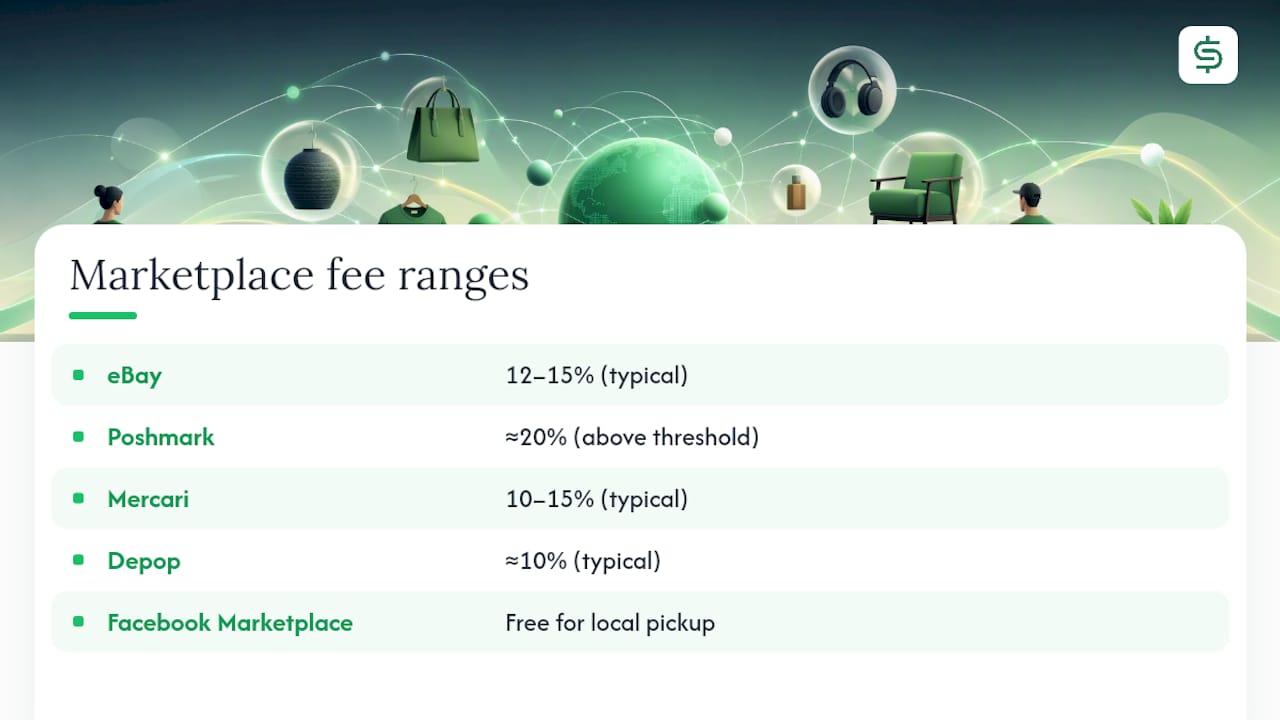
Every platform takes its own bite, so pricing the same item identically everywhere quietly costs you money on the platforms with higher fees. Rough industry ranges: eBay typically runs around 12 to 15%, Poshmark charges roughly 20% on sales above its threshold, Mercari sits closer to 10 to 15%, Depop is around 10%, and Facebook Marketplace is free for local pickup deals.
A simple formula handles this: list price = (target net amount + shipping cost) ÷ (1 minus the platform’s fee percentage). Want to net $30 after a $6 shipping cost on a platform charging 15%? You’d list at roughly $42.35. Run that same target through a 20% fee platform and you’re listing closer to $45.
Whether a paid automation tool is worth it comes down to hours. If manual checking and delisting eats 45 minutes to an hour of your day, a subscription that eliminates most of that pays for itself quickly once you value your own time honestly, which most sellers don’t do until they’ve been burned by an oversell.
Your Pre-Publish Cross-Listing Checklist
Run through this before any item goes live on a second or third platform:
- SKU assigned and visible in your tracking system.
- Photos ready and consistent across every platform you’re posting to.
- Item specifics filled out completely, not left as defaults.
- Title and price adjusted to fit each channel’s buyer expectations and fee structure.
- Inventory source of truth confirmed, whether that’s synced software or your spreadsheet.
- Delist-on-sale method confirmed and tested, not assumed to work.
- A customer-service plan in place for handling returns on items that sold cross-channel.
If something sells on a channel other than eBay, the sequence is always the same: delist it everywhere else first, update your master inventory record second, and notify any interested buyers third if you’ve had recent inquiries.
A Seller’s Note on Keeping It Simple
Most cross-listing advice overcomplicates things. The sellers I’ve watched succeed treat eBay as their anchor platform and add others only when the product fits, not because a blog post told them to be everywhere. My one tip that never fails me: always keep a visible SKU label in the packing photo. It’s saved more shipping mix-ups than any spreadsheet formula I’ve built.
Let SpareDollar Handle the Sync While You Handle the Sales
If you’ve made it this far, you already know the manual grind: checking four apps, updating a spreadsheet, hoping you delisted fast enough. SpareDollar is built for exactly the moment you’re ready to stop doing that by hand. Create your listing once with AI-assisted drafting and eBay-correct item specifics, distribute it across your chosen marketplaces, and let auto-delist catch every sale before it becomes a double-sold headache. Barcode scanning and bulk actions handle the grunt work, and per-channel pricing keeps your margins honest on every platform, not just eBay.
You stay in control of what actually publishes. Nothing goes live without your say-so. That’s the whole point: less time babysitting listings, fewer apology refunds, more time actually selling. Start a free trial and see how many hours a week you get back. Your spreadsheet had a good run.
Where to Check Policy and Learn More
- eBay’s seller standards policy for the current fulfillment and seller obligation rules.
- SpareDollar’s blog on multi-channel inventory management for deeper synchronization strategy.
- SpareDollar’s eBay marketplace page for integration specifics.
Sources
- eBay seller policies (captcha redirect to policy)
- How to Cross List on Multiple Marketplaces: Complete Guide for Resellers | Ecom AI Insights
FAQ
Is cross listing allowed on eBay?
Yes. eBay doesn’t prohibit listing the same item elsewhere, but you’re still required to fulfill any order placed through eBay, regardless of where else the item was listed.
Is crosslisting a good idea?
It’s a good idea for sellers with enough inventory or channel diversity to benefit from added exposure, as long as you have a reliable way to prevent overselling, whether that’s disciplined manual tracking or automation like SpareDollar.
How much does Crosslist cost?
Pricing varies by tool and typically scales with your monthly new-listing volume; SpareDollar offers tiered subscription plans plus a free trial, so check current pricing on the SpareDollar site for exact numbers.
How does cross listing work?
You create a listing for an item, then post matching listings on additional marketplaces, tracking inventory manually or through synced software so that a sale on one platform automatically removes it from the others.